
Walmart Connect Adds Negative Keywords to Sponsored Products: What Changed
Walmart Connect launched negative keywords for Sponsored Products on July 29, 2026. Here's exactly which campaign types support it, the two match types, the limits, and how to find the search terms worth excluding.
By Serhii Khyshchenko, Team Lead (external traffic), UNITIX Agency
See more UNITIX in Google
Add UNITIX to your Preferred Sources.
On July 29, 2026, Walmart Connect added negative keywords to Sponsored Products. Advertisers can now exclude specific search queries directly, instead of cutting an entire keyword, campaign or bid to deal with irrelevant traffic.
Before this, Sponsored Products had no way to do that. The only levers were lowering a bid, changing targeting, or turning off a keyword altogether, all of which affected more than the one irrelevant query. Now a single search term can be blocked without touching anything else in the campaign.
Quick summary
- Only Manual campaigns and Auto campaigns on Fixed Bidding support negative keywords. Dynamic Bidding and Target ROAS don't.
- Two match types: Exact (blocks one query) and Phrase (blocks any query containing it).
- Up to 500 negative keywords per ad group, 80 characters each, and they override positive targeting.
- Switch a campaign off a supported bidding strategy and its negative list gets deleted automatically, with no guaranteed way back.
The new Negative Keywords tab, inside a Walmart Connect Sponsored Products ad group: "running shoes" is this article's own example for Negative Exact Match. Screen recording: UNITIX, over the real Ad Center.
The option isn't available everywhere, though. Support depends on the campaign type and, for automatic campaigns, the bidding strategy.
Which campaigns support negative keywords?
Per Walmart Connect's own US documentation:
The real constraint sits inside automatic campaigns: negative keywords only work with Fixed Bidding. Switch an automatic campaign to Dynamic Bidding or Target ROAS and the option disappears.
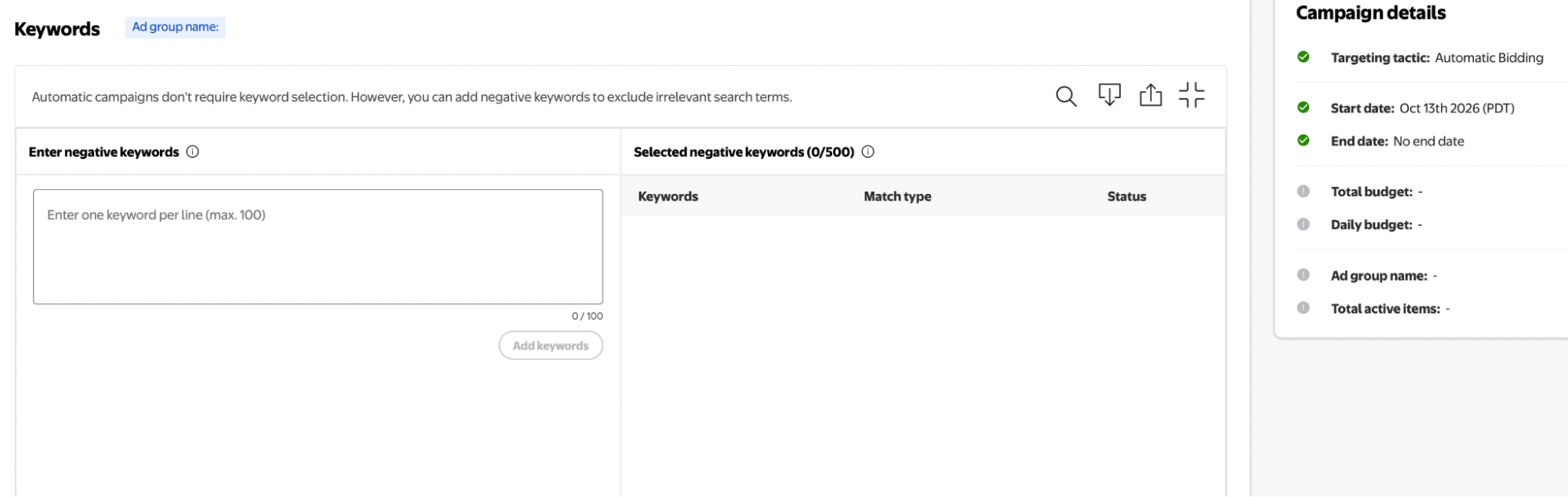
Auto, Fixed Bidding: the negative keywords field is there and active. Screenshot: UNITIX.
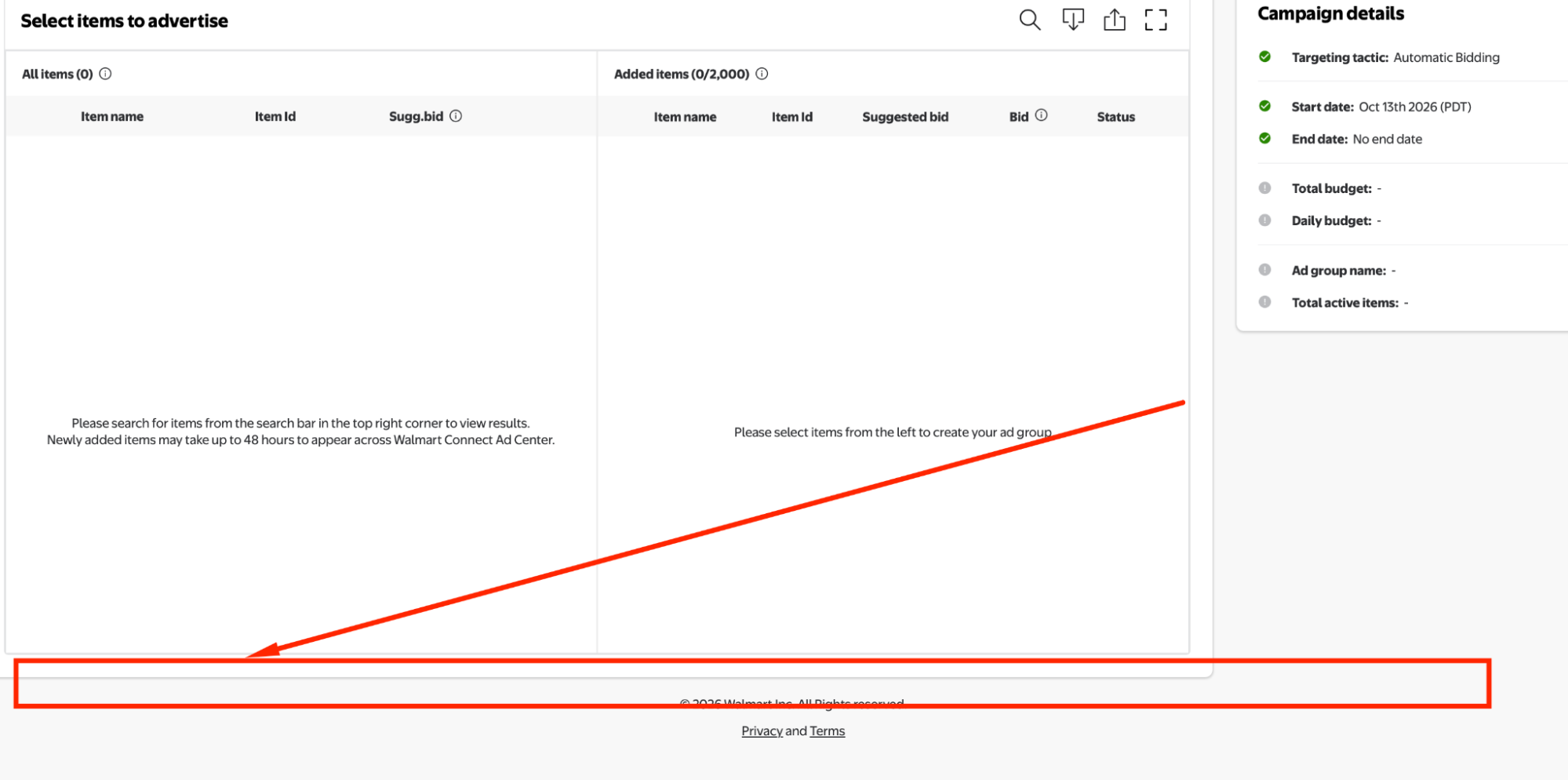
Auto, Dynamic Bidding or Target ROAS: no negative keywords option at all. Screenshot: UNITIX.
Sponsored Brands and Sponsored Video are the two exceptions, and they're different kinds of exceptions. Walmart Connect's US documentation doesn't confirm negative keyword support for Sponsored Brands, while Walmart Connect Canada separately does confirm it for Sponsored Brands there, which is worth flagging precisely because it's easy to assume the two markets match when they don't. Sponsored Video isn't mentioned in this update at all.
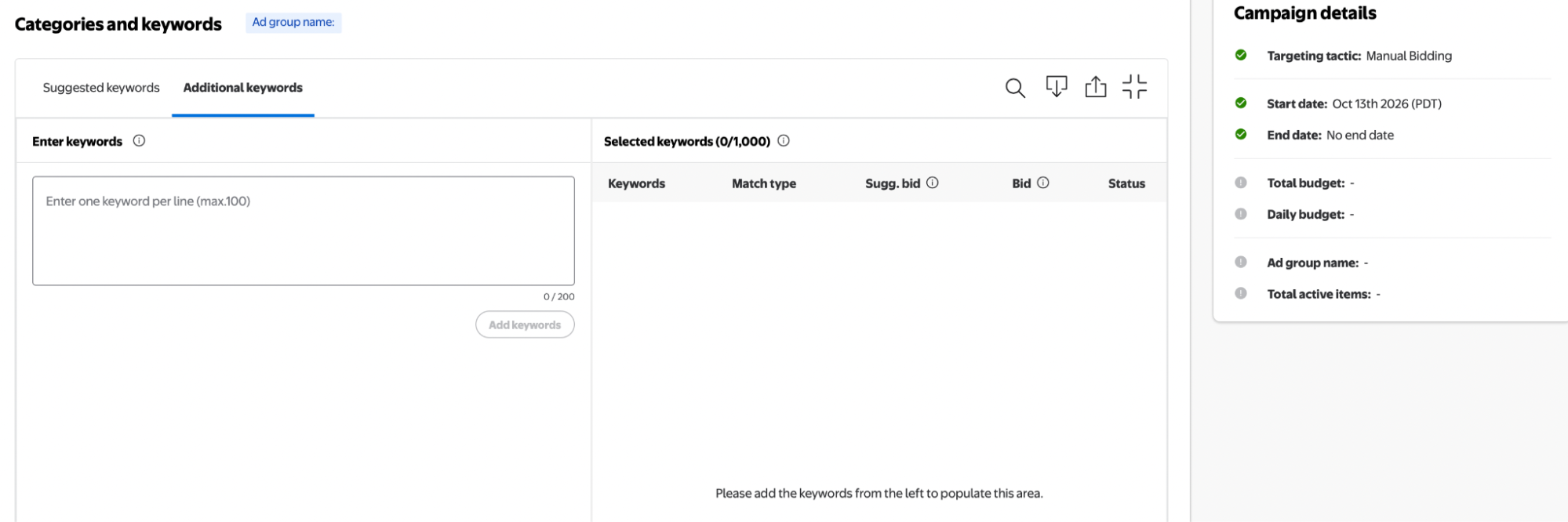
Sponsored Brands: Suggested and Additional keywords tabs, no Negative keywords tab. Screenshot: UNITIX.
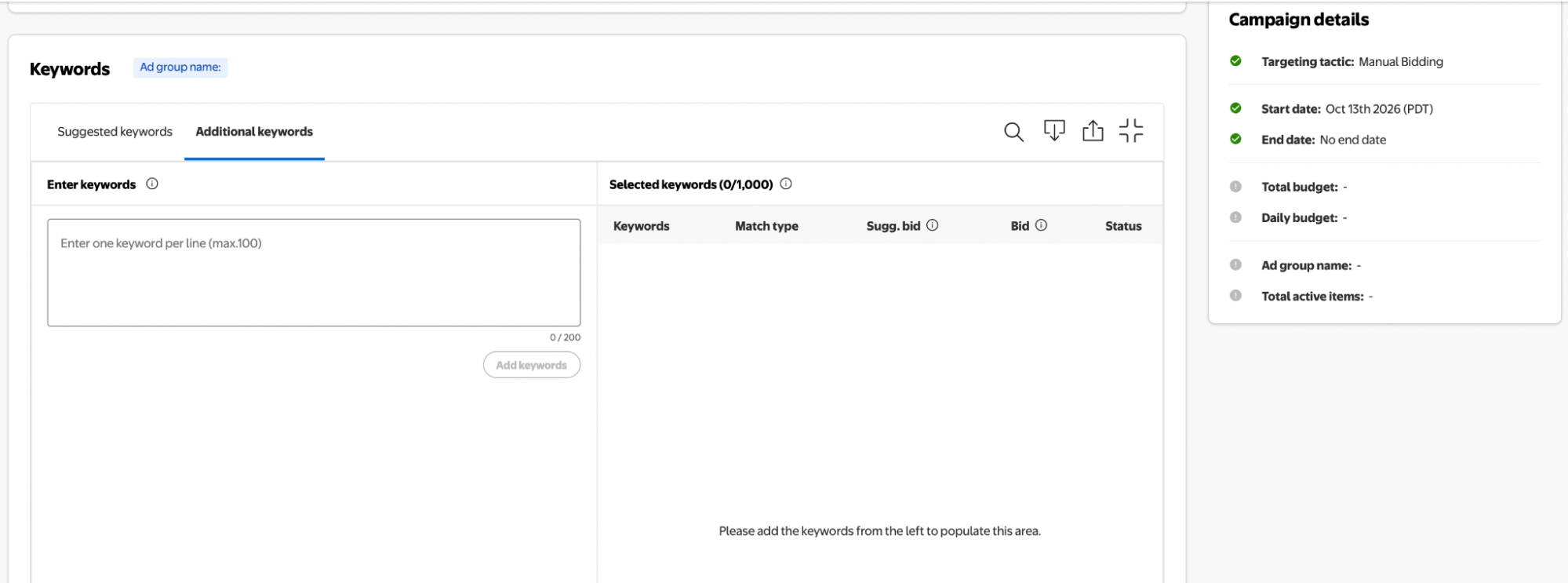
Sponsored Video: same keyword setup, same absence. Screenshot: UNITIX.
The two match types
Walmart Connect supports two negative match types.
Negative Exact Match blocks only the exact query entered. A negative exact for running shoes blocks the query running shoes, and nothing else, so women running shoes still shows the ad.
Negative Phrase Match blocks any query that contains the phrase in that word order. A negative phrase for running shoes blocks women running shoes and running shoes for kids as well, since both contain the phrase intact.
Negative Broad Match isn't supported at all.
Limits and rules
- Up to 500 negative keywords per ad group, combined across Exact and Phrase.
- 80 characters maximum per negative keyword.
- Negative keywords override positive targeting. If the same term is both a target and an exclusion, it gets blocked.
- No moderation required. A negative keyword can be activated, paused or archived immediately.
Negatives can be added when a campaign is created, or into an ad group of a campaign that's already running.
The strategy-switch trap
Switching a campaign from a supported bidding strategy to an unsupported one deletes its negative keywords automatically. Switching back triggers an attempt to restore them, but Walmart doesn't guarantee that works. Export or save the negative list before changing bidding strategy, not after.
Negative keywords also don't show up as their own line in Snapshot V2 performance reports. Their effect has to be read from a separate report, not from the campaign dashboard.
Where to find the search terms worth excluding
The Item Keyword Performance Report, under Reports → On-Demand → Request Report → Item Keyword Performance in the Walmart Connect Ad Center, covers both automatic and manual Sponsored Products campaigns. It returns:
- Searched Keyword: what the shopper actually typed.
- Bidded Keyword: the keyword being targeted.
- Clicks and Spend.
- Attributed Orders and Sales.
- Campaign, Ad Group and Item behind each result.
That's the data an irrelevant, high-spend, low-return search term shows up in.
One limit worth knowing before trusting the numbers: Item Keyword Performance only covers Search In-grid placements, so its totals won't match a campaign's overall performance. For impression share and visibility by search term specifically, the Search Term Impression Share Report covers that separately.
Building the negative list from that report, in order:
- Pull the Item Keyword Performance Report for the campaign or ad group in question.
- Sort by spend, and look at the searched keywords carrying real spend with few or no attributed sales, not just a single bad day.
- Check relevance, not just the number: a term can have spend and zero sales simply because it has low volume so far.
- Add the ones that clear both checks as Negative Exact or Negative Phrase, depending on whether related variations should be blocked too.
What this changes for Walmart PPC
Excluding irrelevant traffic without touching the rest of the campaign. A search term that doesn't match the product can now be blocked directly, instead of lowering a bid across the whole targeting to deal with it.
More control inside Auto campaigns. Automatic Fixed Bidding campaigns can now exclude specific irrelevant or underperforming queries while keeping automatic discovery running for everything else.
More deliberate traffic splitting between Auto and Manual. A term that performs well in Auto can be tested in Manual with its own bid, and Negative Exact can help route traffic between the two campaigns. Pull a term out of Auto only after Manual has proven it out; excluding too early risks losing sales Auto was already closing.
Tighter spend without guessing. Negatives cut spend on terms that don't convert, but not every zero-sale search term deserves exclusion on sight: check clicks, spend, relevance and whether there's enough volume behind the number first. Switching an automatic campaign from Dynamic Bidding to Fixed Bidding purely to unlock negative keywords isn't automatically worth it either; that decision should follow how the current strategy is actually performing, not the feature alone.
UNITIX's take
Negative keywords close a real gap: Walmart's automatic campaigns could not be fine-tuned before, only turned off. Fixed Bidding is now the one setup that gets both automatic discovery and the ability to cut what it discovers wrong. The strategy-switch trap is the detail worth watching, since it is easy to reorganize a bidding strategy without remembering the exclusion list rides on it. It is the kind of account-maintenance detail our Walmart advertising work is built to catch before it costs a client their negative list.
Negative keywords are also one more thing Walmart Connect's setup handles differently from Amazon's, on top of the targeting and reporting differences already there. The full side-by-side, tested in both consoles, is in Walmart vs Amazon.
Common questions
When did Walmart Connect add negative keywords to Sponsored Products?
July 29, 2026. Before that, Sponsored Products had no negative keyword option at all: the only way to cut irrelevant traffic was to lower bids, change targeting, or pause the keyword or campaign outright.
Which Walmart Sponsored Products campaigns support negative keywords?
Manual campaigns, and Automatic campaigns on Fixed Bidding. Automatic campaigns on Dynamic Bidding or Target ROAS do not support negative keywords at all. Sponsored Brands support in the US is not confirmed by Walmart Connect's documentation, though Walmart Connect Canada separately confirms it for Sponsored Brands there, so the two markets shouldn't be assumed to match. Sponsored Video is not part of this update.
What's the difference between Negative Exact and Negative Phrase match on Walmart?
Negative Exact blocks only that specific search query: adding running shoes as a negative exact blocks running shoes but not women running shoes. Negative Phrase blocks any query containing that phrase with its word order intact: running shoes as a negative phrase blocks women running shoes and running shoes for kids too. Negative Broad match isn't supported.
How many negative keywords can I add, and what happens if I switch bidding strategy?
Up to 500 negative keywords per ad group, combined across Exact and Phrase, at a maximum of 80 characters each. Negative keywords take priority over positive ones: if a term is both targeted and excluded, it gets blocked. Switching a campaign from a supported bidding strategy to an unsupported one deletes its configured negative keywords automatically; switching back triggers an attempt to restore them, but Walmart doesn't guarantee it. Save your negative list before changing bidding strategy.
How do I find which search terms to exclude?
The Item Keyword Performance Report, under Reports → On-Demand → Request Report → Item Keyword Performance in the Walmart Connect Ad Center, for both automatic and manual Sponsored Products campaigns. It shows the searched keyword, the bidded keyword, clicks, spend, attributed orders and sales, and the campaign, ad group and item behind each result. It only covers Search In-grid placements, so its numbers won't match a campaign's overall totals; the Search Term Impression Share Report covers visibility by search term separately.
Published by UNITIX Agency, an Amazon growth agency and an Amazon Ads Verified Partner. More at unitix.pro/insights.
Check your own product
ASIN Inspector
Paste an ASIN or an Amazon product link. You get the price and Buy Box, rank and how it has moved, ratings, images and video, and the search terms the product is clicked on. Free, and it needs no access to your account.