Standalone Amazon PPC SaaS

Manage Amazon PPC in one workspace

UNITIX SOFT brings campaign management, product-level analytics, bulk actions, and controlled automation together for brands, agencies, and in-house PPC teams.

Free for 14 days, no payment up front. No agency engagement required.

Take the product tourHow we use it on accounts

Dashboard

Included in Core

The Amazon ads dashboard, read as a whole

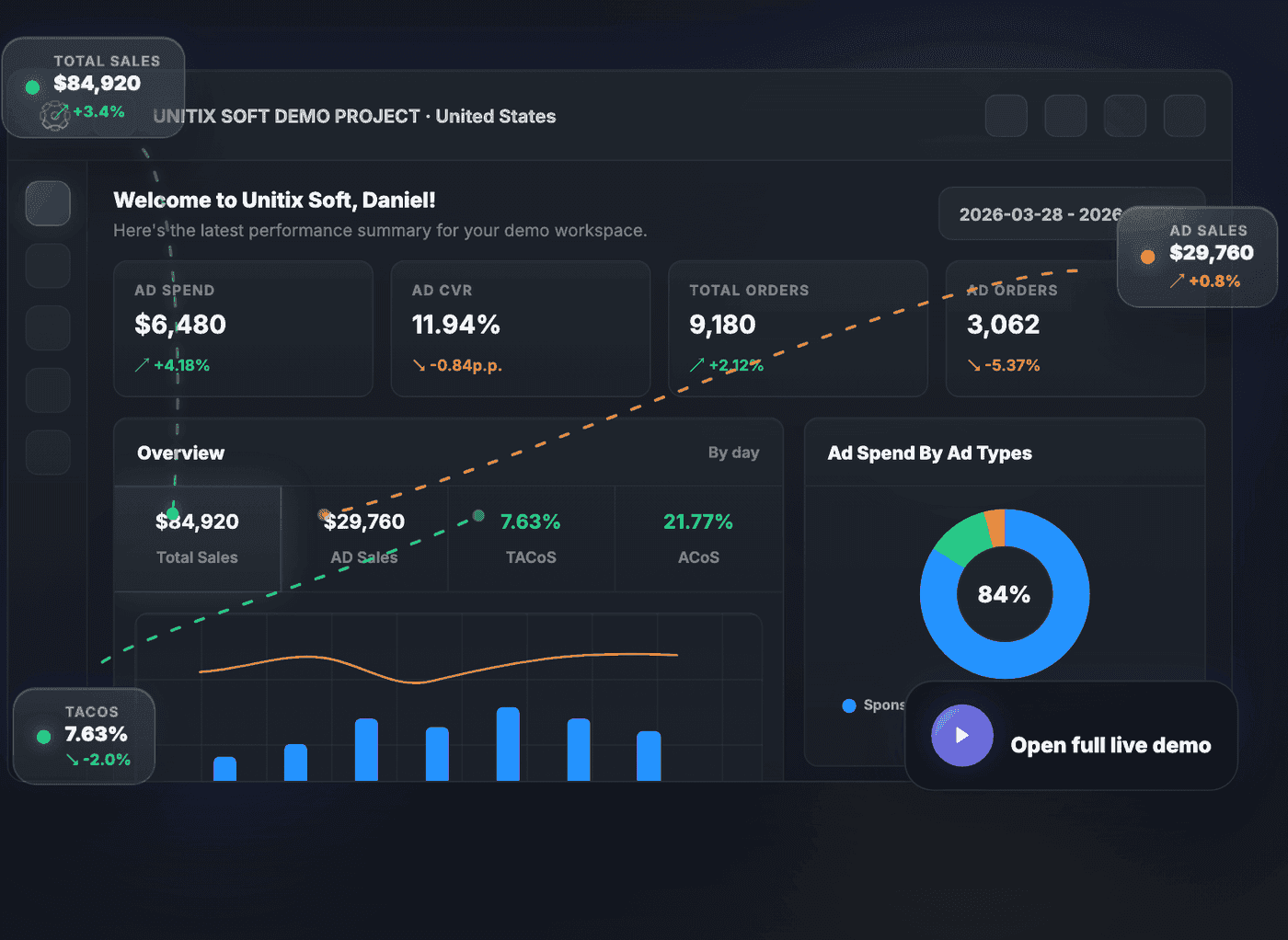
The dashboard puts ad spend, ad conversion rate, total and ad orders, total and ad sales, ACoS and TACoS on one screen, each against its own change for the period. The overview chart switches between a daily, weekly, and monthly reading of the same range, so a spike and a trend are never the same view. Spend splits by ad type across Sponsored Products, Brands, and Display, and sales split between PPC and organic.

Chart granularity:By dayBy weekBy month

UNITIX SOFT dashboard showing ad spend, conversion rate, orders, sales, ACoS and TACoS tiles above an overview chart, an ad-type spend split, and a PPC versus organic sales split
Demo dataCaptured from the UNITIX SOFT demo workspace. The interface is real; every figure in it is sample data, not a client account.Swipe the image to see the rest.Open full size

Products

Included in Core

Product analytics, two ways to read one ASIN

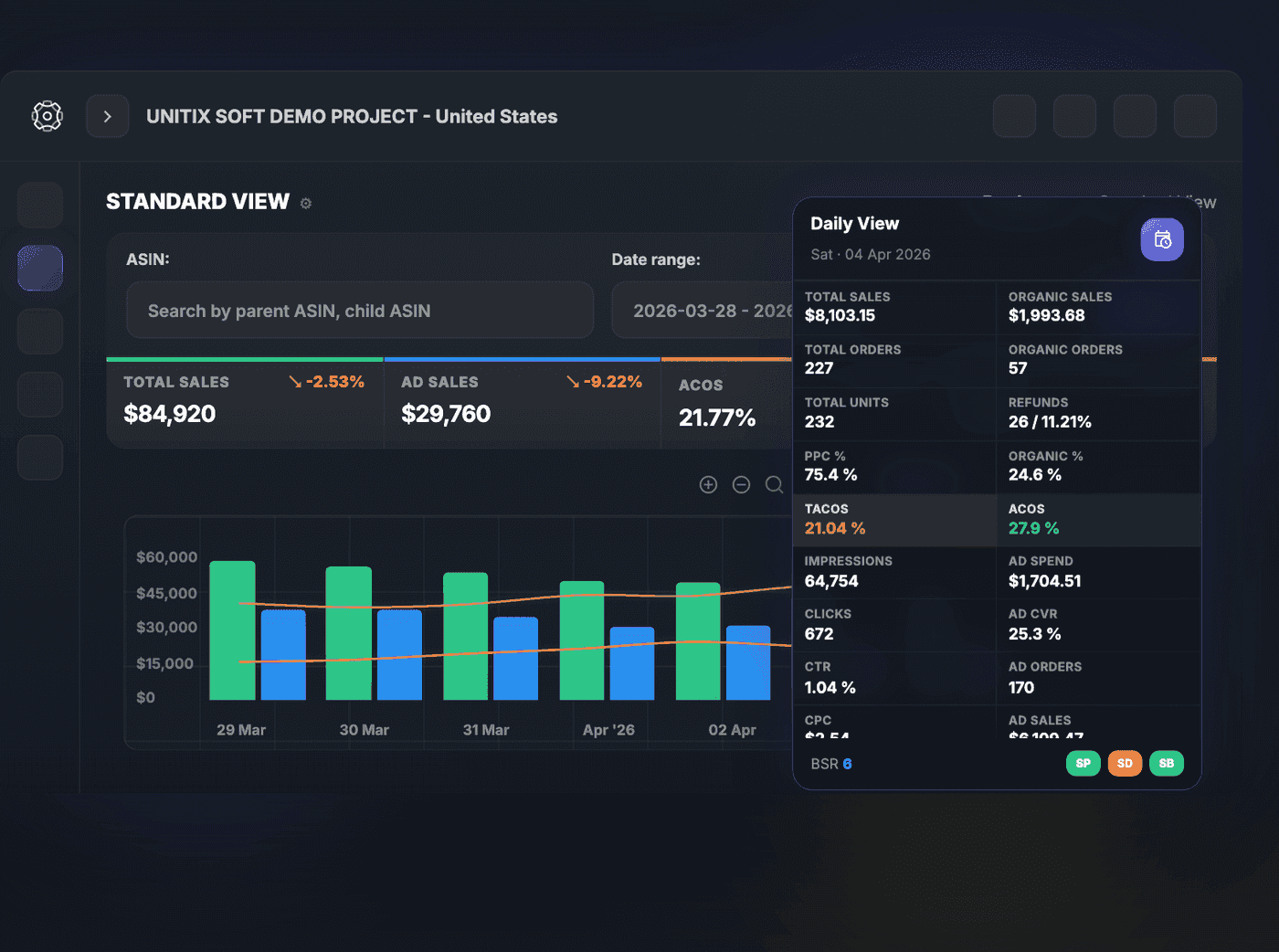
Search by parent or child ASIN, set a date range, and read the product either way. Standard View gives the trend: total and ad sales, ACoS and TACoS across the period. Daily View gives one day in full, including organic sales and orders alongside paid, units, refunds as a count and a rate, impressions, clicks, CTR, CPC, ad conversion rate, the PPC and organic share of the day, Best Sellers Rank, and the split across Sponsored Products, Display, and Brands.

Views:Standard ViewDaily View

UNITIX SOFT product analytics: an ASIN search and date range above Standard View sales and ACoS figures, with a Daily View panel listing organic sales, orders, units, refunds, impressions, clicks, CTR, CPC and Best Sellers Rank for one day
Demo dataCaptured from the UNITIX SOFT demo workspace. The interface is real; every figure in it is sample data, not a client account.Swipe the image to see the rest.Open full size

Advertising

Included in Core

Campaign management, down to the search term

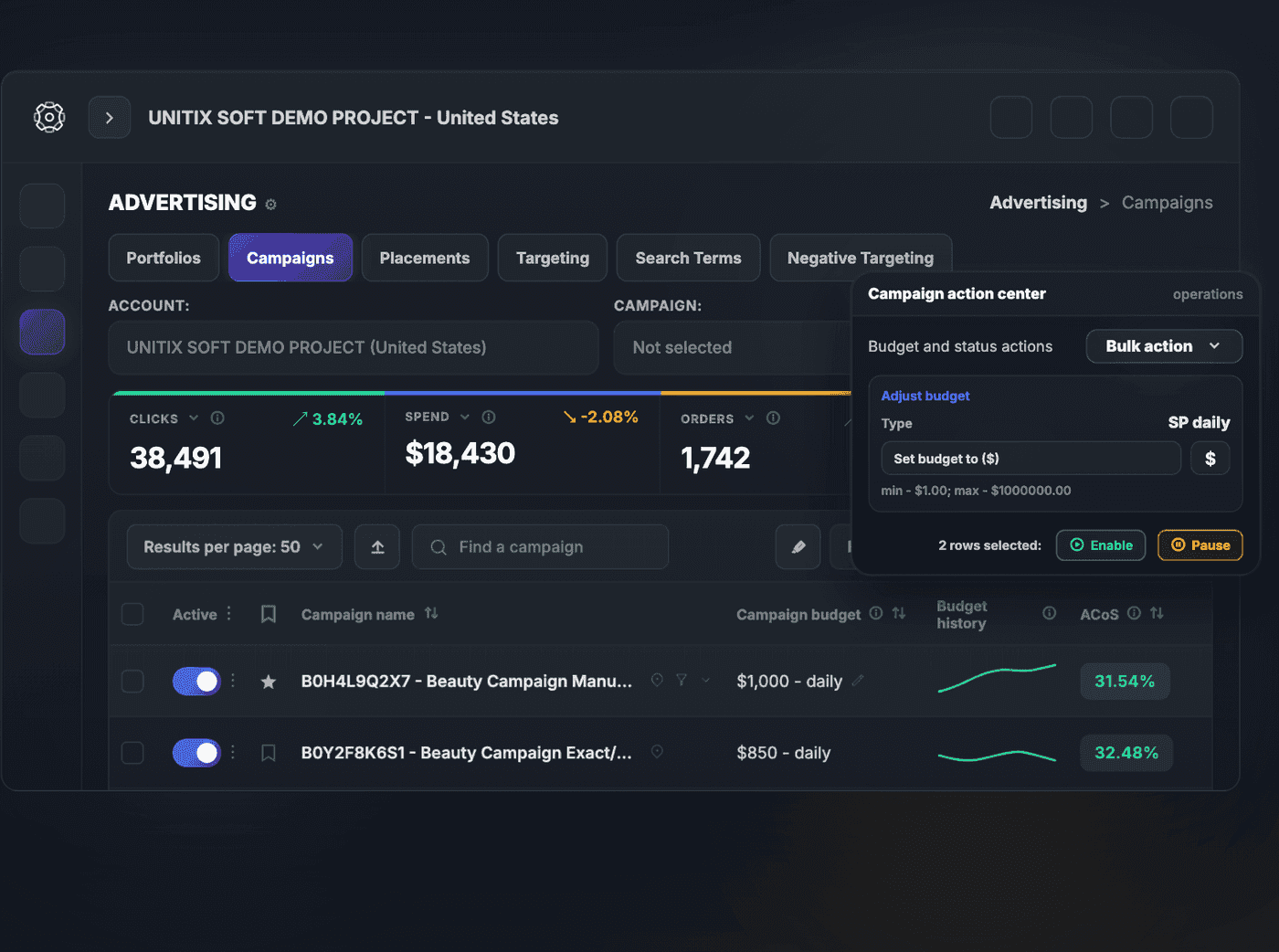
Where most Amazon PPC tools give you one table, the advertising section gives you six. Campaigns, portfolios, placements, targeting, search terms, and negative targeting each get their own view, filtered by account and campaign, with configurable columns and per-page limits. The campaign action centre applies changes in bulk: select rows, adjust budgets by amount or set them outright, and enable or pause together. Budget history sits beside the current budget, so a change can be read against what preceded it.

Sections:CampaignsPortfoliosPlacementsTargetingSearch TermsNegative Targeting

Bulk actions on selected rows:Enable and pauseBudgetsSP, SB and SBV bidsTOS, PP, ROS and Business placement percentagesDaypartingNegative targetsSaved filter presets

UNITIX SOFT advertising section with tabs for campaigns, portfolios, placements, targeting, search terms and negative targeting, a campaign table showing budget and ACoS, and a campaign action centre for bulk budget and status changes
Demo dataCaptured from the UNITIX SOFT demo workspace. The interface is real; every figure in it is sample data, not a client account.Swipe the image to see the rest.Open full size

Automation

Automation plan

Amazon PPC automation: rules that watch, and report

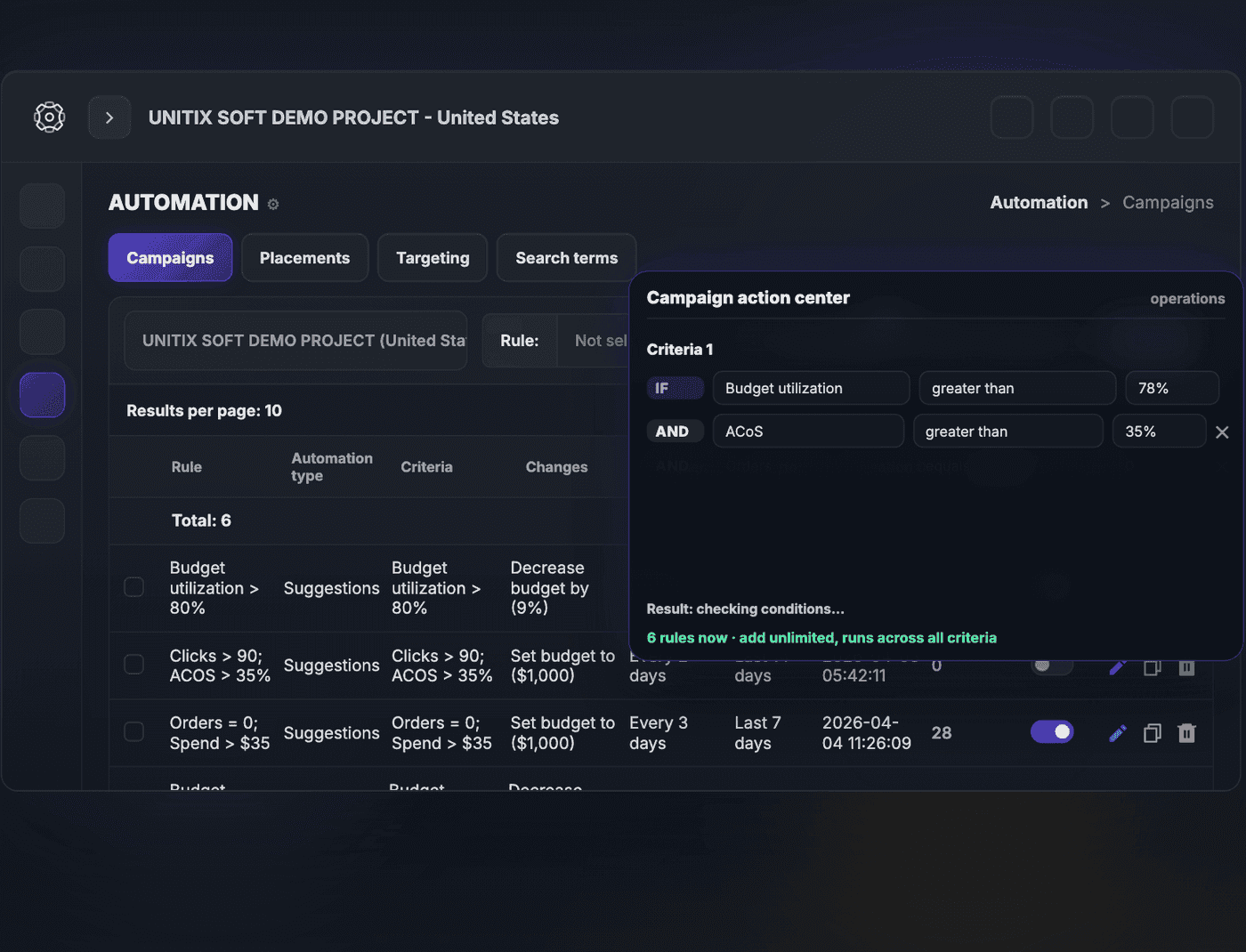
A rule is built as conditions and an action: if budget utilisation is above a threshold and ACoS is above another, decrease the budget by a set amount, or pause the campaign, or set a budget outright. Conditions stack with AND, and rules run on their own schedule, daily or every few days or weekly, against a chosen lookback window. Each rule carries the count of suggestions it has produced and can be switched off without being deleted. A change log records what actually happened.

Rules apply to:CampaignsPlacementsTargetingSearch terms

UNITIX SOFT automation section showing a rules table with automation type, criteria, changes, frequency, period and suggestion count, beside a rule builder combining budget utilisation and ACoS conditions
Demo dataCaptured from the UNITIX SOFT demo workspace. The interface is real; every figure in it is sample data, not a client account.Swipe the image to see the rest.Open full size

It proposes. You decide.

Rules watch the account continuously. Nothing they find is applied until you say so.

The automation type is called Suggestions for a reason. A rule that matches does not reach into the account. It produces a suggestion, counts it, and waits, with the data that produced it and a change log of what was applied before. You or anyone on your team with access can apply it, change it, or throw it away.

A rule that is right nine times out of ten still fires on the tenth account, and on Amazon the tenth is usually the one carrying the category. So the software does what software is better at, which is watching every campaign, placement, and search term without getting tired, and the judgement stays with a person.

What UNITIX SOFT does on its own is watch and check the rules. Changing the account is always a person’s decision, never the software’s.

On accounts UNITIX Agency manages, the same thing happens with your named specialist reviewing the queue. Want specialists to run the account for you?

  1. Rule matches

    Conditions met on a campaign, placement, target, or search term

  2. Suggestion queued

    Proposed change, with the data that produced it

  3. Specialist decides

    Applied, adjusted, or rejected

  4. Change log

    What was applied, and when

Between step two and step three, nothing has touched your account. That pause is the point of the whole thing.

Try UNITIX, use everything, then choose your plan.

Every customer starts with a free trial, continues with full UNITIX access for the first two paid months, and chooses Core or Automation only after that period.

  1. 1Free trial

    14 days

    Explore UNITIX before the first payment.

  2. 2Full access

    100 USD / month

    All modules included for the first two paid months.

    All modules2 accounts3 usersNo long-term commitment

  3. 3Choose a plan

    After month 2

    Continue with Core or Automation.

Choose after month 2

Compare Core and Automation for the preferred billing period.

Billing period

Core

Standard monthly subscription without automation for sellers who need clean analytics, tracking, bulk manual campaign management, and reporting.

120 USD/ month

Billed yearly, 1,440 USDkeeps 360 USD

Dashboard and workspace

  • Overview, Products, Ads and Insights tabs
  • Campaign type, targeting, placement and search-term views

Product analytics

  • Daily View and Standard View per ASIN
  • Top-selling campaigns by ad type

Advertising management

  • Portfolios, campaigns, placements and targeting
  • Bulk actions on any selected rows
  • Dayparting, negative targets and saved filter presets

Automation

Keeps automation after month 2

Full monthly UNITIX subscription with automation for teams that want analytics plus workflow acceleration.

200 USD/ month

Billed yearly, 2,400 USDkeeps 600 USD

Everything in Core, plus

  • An automation workspace with its own tabs
  • Rule criteria, automation type and suggested change
  • Frequency, period and suggestion volume in one table
  • Unlimited rules, across all criteria

The subscription is the whole price. UNITIX SOFT takes no percentage of your advertising spend, so scaling a campaign does not raise what the software costs.

Support is available around the clock, by email or messenger.

Onboarding is included on every plan, not held back for the largest one.

Prices in USD, reviewed 3 August 2026.

Where to check it

Four things a buyer can confirm without taking our word for any of them.

  • Amazon Selling Partner Appstore badgeAmazon Selling Partner Appstore

    UNITIX SOFT is published in Amazon's app marketplace as a Selling Partner API application. Applications are reviewed by Amazon before they are listed.

  • Amazon Ads Verified Partner badgeAmazon Ads Verified Partner

    The software is one half of the answer; the other is who operates it. UNITIX Agency is listed in Amazon's own partner directory as verified to manage Amazon Ads accounts on behalf of clients.

  • G2 logoG2 reviews

    Independent reviews from verified users, on the platform B2B software buyers use to compare Amazon advertising tools. The current rating is on the profile.

  • UNITIX SOFT logounitixsoft.pro

    The product site, where UNITIX SOFT is sold on its own. You do not have to be a client of the agency to use it.

Choosing between running Amazon PPC on software and having a team run it? We wrote the honest comparison, including where the software is the better answer.

What users say on G2

Verified users, reviewed on G2. Every card links through to the original.

G2 Users Love Us award for UNITIX SOFT

Read them on G2

Common questions

Can I use UNITIX SOFT without hiring the agency?

Yes. UNITIX SOFT is sold on its own at unitixsoft.pro and you do not have to be an agency client to use it. Our own specialists run client accounts in it as well.

What does UNITIX SOFT cost?

Core is 150 USD a month, 135 on a six-month term at 810 USD prepaid, or 120 billed yearly at 1,440 USD. Automation is 250 a month, 225 on six months at 1,350 USD, or 200 billed yearly at 2,400 USD. Before either, every customer gets a 14-day free trial and then two paid months of full access at 100 USD a month, and chooses a plan after that. The subscription is the whole price: UNITIX SOFT takes no percentage of advertising spend.

Can I see the software before paying for it?

Three ways. There is a public product tour you can open without signing up, a 14-day free trial, and a booked demo with a specialist who walks through the workspace and answers questions about your own setup.

Does UNITIX SOFT change my campaigns automatically?

No. Rules produce suggestions rather than applying changes. Each rule shows how many suggestions it has generated, and a change log records what was actually applied. The decision stays with the person accountable for the account.

What can the automation rules act on?

Campaigns, placements, targeting, and search terms. A rule combines conditions such as budget utilisation, ACoS, clicks, orders, or spend, and proposes an action such as decreasing a budget, setting a budget, or pausing a campaign. Rules run daily, every few days, or weekly against a chosen lookback window.

How deep does the reporting go?

To search-term level. Performance is broken out by portfolio, campaign, placement, targeting, search term, and negative targeting, and per product by parent or child ASIN in both a trend view and a single-day view that includes organic sales, refunds, CTR, CPC, and Best Sellers Rank.

Is there a free trial?

Yes, 14 days, with no payment up front. There is no permanent free plan. UNITIX SOFT is bought and used on its own, so no engagement with UNITIX Agency is required to try it or to keep using it.

How is UNITIX SOFT rated by its users?

Users review it publicly on G2. The current rating and the full set of reviews are on the profile, which stays up to date as new ones come in.

Is UNITIX SOFT an official Amazon partner application?

Yes. It is published in the Amazon Selling Partner Appstore as a Selling Partner API application, which means it passed Amazon's review before being listed.

Is it only for Amazon?

The software is built for Amazon advertising. UNITIX Agency also runs Walmart Marketplace advertising as a managed service, but that work is not managed inside UNITIX SOFT.

Want to see it running on your account?

Book a demo and a specialist walks through the workspace with your setup in front of you.