
Amazon ad prompts: what they are, how they work, and where to see all of them
Amazon adds AI prompts to Sponsored Products and Sponsored Brands campaigns automatically and bills their clicks as part of CPC. What a shopper sees, where the text comes from, what Amazon reports, and a new way to manage them in UNITIX Soft.
By Mariya Tkach, Head of Marketing and Growth, UNITIX Agency
See more UNITIX in Google
Add UNITIX to your Preferred Sources.
Amazon now writes short questions into your ads, the kind a shopper would ask before buying. These are prompts: AI-powered conversational ads that Amazon adds to Sponsored Products and Sponsored Brands campaigns by itself, and bills by the click.
Short answer. Prompts show clickable product information or frequently asked questions in shopping results and on product detail pages. A click opens a conversation with Alexa for Shopping, or answers right on the page. Amazon writes the text from your listing, Brand Store and campaign data, enrolls campaigns automatically, and since 25 March 2026 charges prompt clicks as part of your CPC. You can pause any prompt in the Amazon console, where they are shown one ad group at a time, or in UNITIX Soft, where they are shown for the whole account, a portfolio or a campaign and can be paused in bulk.
What a prompt is
Amazon calls prompts a virtual product expert that sits inside your existing ads. Instead of waiting for the shopper to ask, the ad offers the question or the detail at the point where they are deciding: a feature, a use, a comparison, a common question.
Both campaign types get them:
- Sponsored Products prompts attach to your product ads.
- Sponsored Brands prompts attach to your brand ads, and are the ones Amazon is extending first (more on that below).
What a shopper sees, and what happens on a click
A prompt appears in shopping results or on a product detail page. In search it sits under the ad as a question in a blue pill: under a Sponsored Brands banner ("Why choose Cleastra home cleaning essentials?"), under a Sponsored Products ad ("How does it perform with dense bread dough?"), or under a brand's row of products.
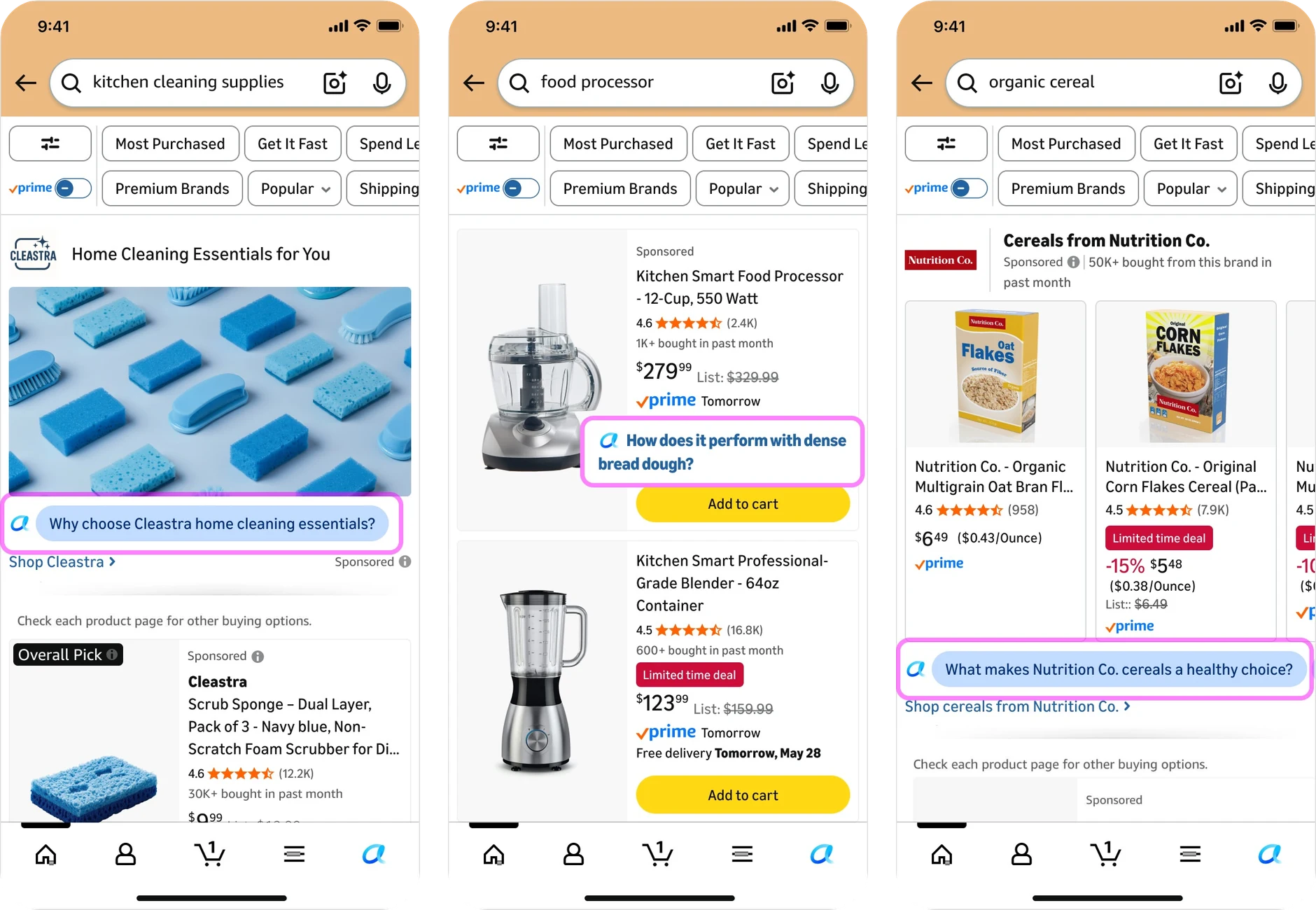
Sponsored prompts in shopping results. Image: Amazon Ads; the brands are Amazon's examples.
When the shopper clicks it, Amazon either answers on the page where the prompt appeared, or opens a conversation with Alexa for Shopping, Amazon's shopping assistant. On a detail page the prompt sits among the ordinary suggested questions, marked Sponsored, and the answer comes with more questions to follow.
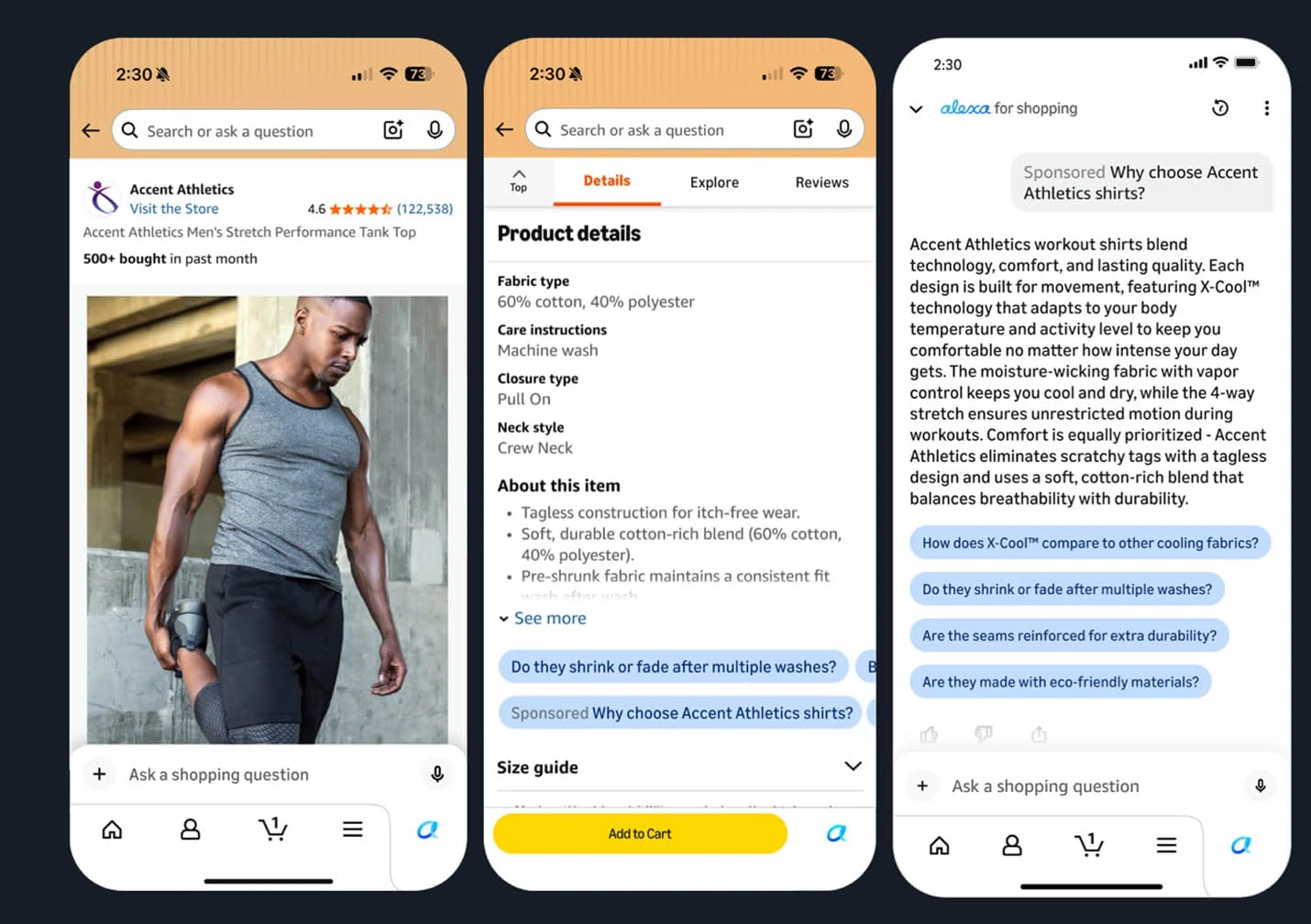
A prompt on a product detail page opens a conversation with Alexa for Shopping. Image: Amazon Ads.
Amazon's original launch page said the click "may open a dialog in Rufus". Since then Amazon has combined Rufus and Alexa+ into one experience, Alexa for Shopping, and its later pages describe prompts as opening a conversation there. The background is in Rufus became Alexa for Shopping.
Where the text comes from
Nobody at your company writes these prompts. Amazon builds them from its first-party signals: your detail pages, your Brand Store, your campaign data and more.
That has two consequences worth knowing:
- There is no setup. Existing campaigns are enrolled automatically, and prompts use the campaign's existing settings, targeting included.
- The listing is the source. If the product page does not answer a question well, the prompt built from it will not either. A weak prompt is often a listing problem before it is an ad problem. Writing listings for that assistant is what our Alexa for Shopping optimization service does, and how the assistant reads a listing is covered in Alexa for Shopping answers questions your listing never answers.
How to monitor Amazon prompts across your account
Amazon gives three ways in. The Prompts tab in the Ads Console shows the prompts of one ad group and lets you pause each one. The Prompts report covers the whole account as a file. The Amazon Ads API lets prompts be reviewed and managed in code.
UNITIX Soft puts the same prompts into one live table: Sponsored Products and Sponsored Brands together, for the whole account, a portfolio or a campaign, with spend, sales, orders, ACoS and CVR per prompt, statistics kept for the whole period rather than a rolling window, and bulk Enable or Pause on the rows you select. The details are at the end of this article.
UNITIX Soft
Manage Amazon prompts across your campaigns
View performance, find the prompts that spend without orders, and enable or pause Sponsored Products and Sponsored Brands prompts from one table.
Explore UNITIX SoftDates, markets and billing
| Open beta | November 2025 |
| General availability | 25 March 2026 |
| Market | United States |
| Who | Sponsored Products and Sponsored Brands advertisers, except authors and publishers |
| Billing | Prompt clicks charged within your CPC bidding and billing |
| Control | Pause any prompt at any time: in the Ads Console, through the API, or in UNITIX Soft, one at a time or in bulk |
The billing line is the one worth reading twice. Prompts arrived switched on, and every click on one is ad spend.
What Amazon says about results
Amazon has published two figures, both about Sponsored Brands:
- "In early Amazon testing, nearly 20% of shoppers who interact with a Sponsored Brands prompt continue the conversation about that brand."
- "Adding prompts to a Sponsored Brands ad drives a 6% increase in conversions."
Both are Amazon's own numbers. Amazon does not say how they were measured, on how many advertisers or over what period, so they describe Amazon's tests, not your account. The launch page itself gives no performance figures at all.
Where to find prompts in the Amazon Ads console
Amazon gives two views.
The Prompts tab. Inside a campaign, go to the ad group, then Ads, then Prompts. The tab lists the prompts for that ad level once they have received a click, with the prompt text, the associated ad, impressions, clicks and orders. Each prompt has its own switch, which is where you pause it (UNITIX Soft has the same switch, plus bulk actions across the account). In Amazon's own screenshot the table notes that only prompts with clicks in the last 65 days are available. UNITIX Soft keeps prompt statistics for the whole period.
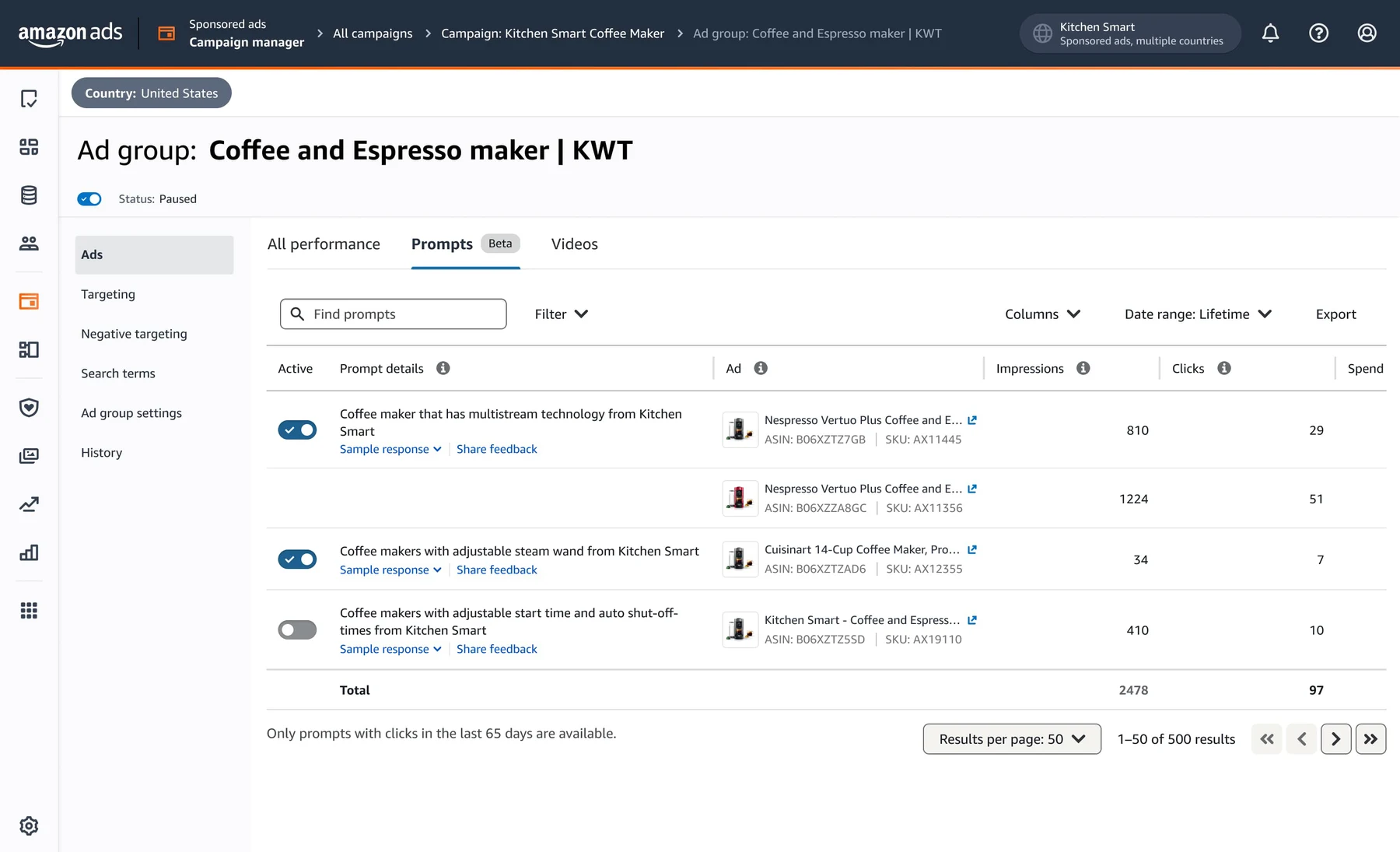
The Prompts tab inside one ad group in the Amazon Ads console. Image: Amazon Ads.
Under each prompt, Sample response shows the kind of answer a shopper gets when they click it. Amazon notes that actual responses may differ from the sample.
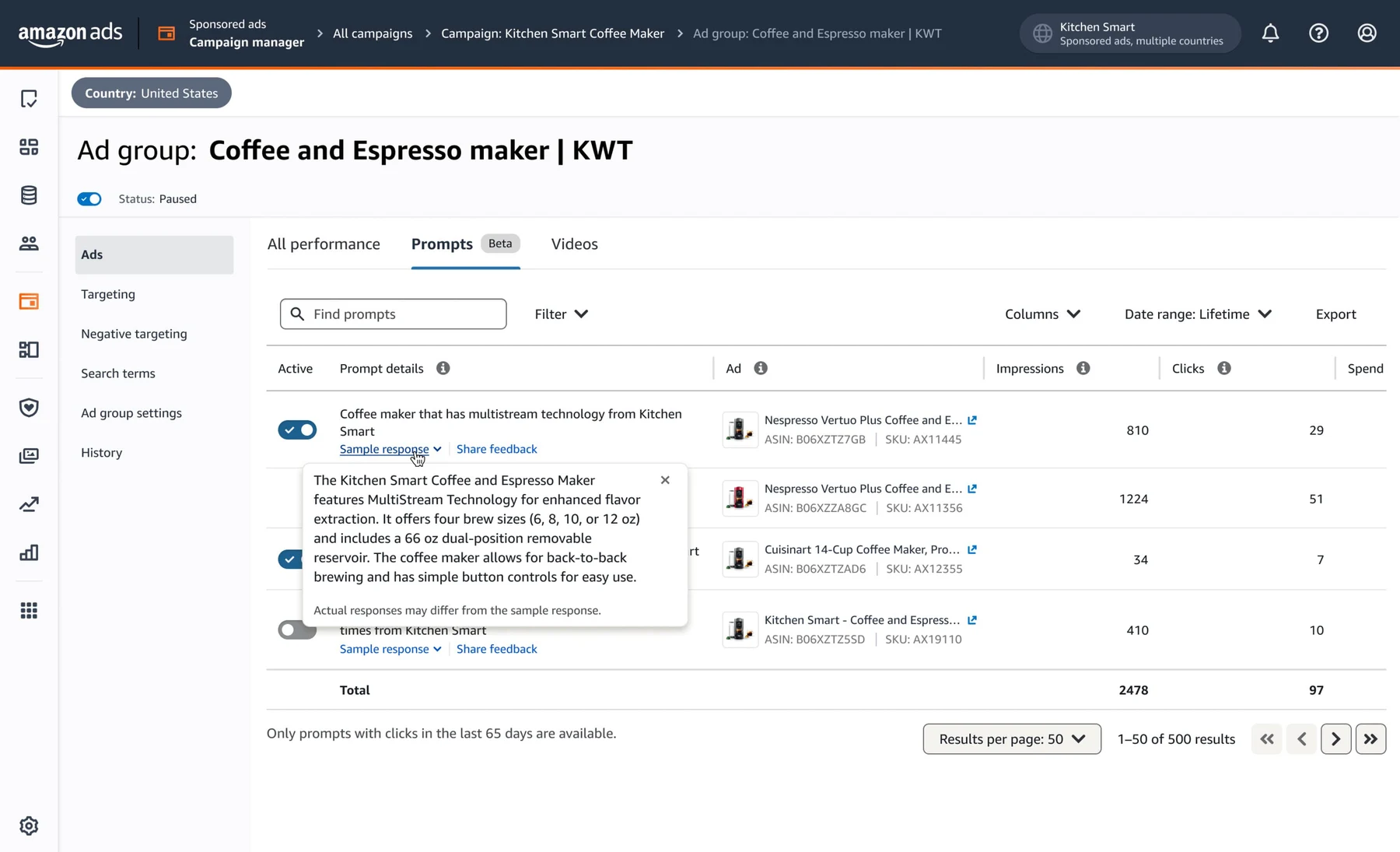
Sample response for a prompt. Image: Amazon Ads.
The Prompts report. Under Reports, choose Create report, the Sponsored Products category, and the report type Prompts. It carries:
- prompt text and associated ad;
- impressions, clicks, click-through rate and cost per click;
- spend, sales, ACOS and ROAS;
- 7-day orders and units.
So the live view sits inside each ad group, one at a time, and the account-wide view is a report you download. On an account with dozens of campaigns, seeing which prompts are spending means opening ad group after ad group, or working from a file.
What comes next: Branded Conversations
Amazon calls Branded Conversations "the next evolution of Sponsored Brands prompts". Brands will be able to add their own expertise to Alexa for Shopping conversations: what sets them apart, how their products meet a customer's needs, and how products go together. Amazon's example is a skin care brand guiding a shopper through a daily routine. Branded Conversations are marked as Sponsored and are due to launch in the United States in January 2027. Amazon announced them together with Review Requests, the new campaign that asks verified buyers for a review, and in the same season as Amazon Ads Agent and its two new campaign types.
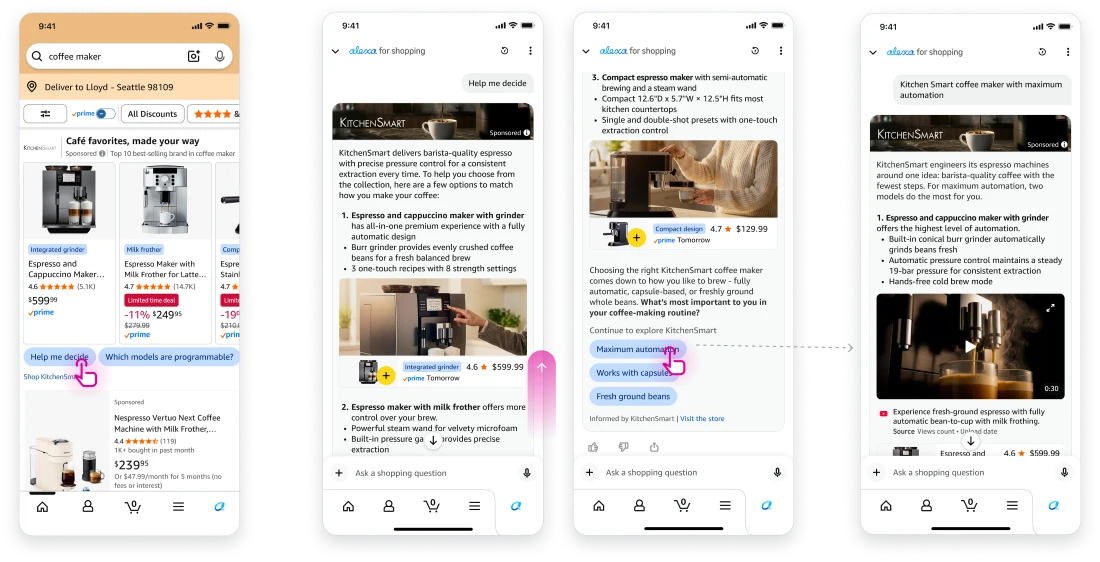
How a Branded Conversation unfolds. Image: Amazon Ads.
What to check first
On an account where prompts have been running since March without anyone looking:
- Sort by spend. The prompts that cost the most are the first to read, whatever their ACoS.
- Look for spend with no orders. A prompt with clicks and zero orders is spending on a question that did not lead to a sale.
- Read the text. Amazon writes the prompt from your listing. A question that promises something the product page does not answer is a listing problem as much as an ad problem.
- Compare SP with SB. The same product can carry prompts in both campaign types, and they do not have to perform alike.
When should you pause an Amazon prompt?
There is no universal threshold, because what counts as too much spend depends on the product's price, margin and the rest of the campaign. A pause decision looks at the prompt's spend, clicks, orders, sales and ACoS together, over a period long enough to mean something.
Attribution matters here. Amazon's Prompts report counts orders within 7 days of a click, so the most recent days are not final: a prompt that looks like it has clicks and no orders this week may still collect them. Read a window that has fully closed.
Scenario A: a profitable prompt. The prompt gets clicks and sales, and its ACoS sits within what the campaign accepts. Leave it on; it is doing what the ad was bought for.
Scenario B: high spend, no orders. The prompt has spent a meaningful share of the budget with no orders. Check that the data covers enough clicks and that the attribution window has passed. If it still shows nothing, it is a candidate for Pause, and the listing behind it is worth reading, since the prompt was written from it.
Amazon Ads console vs. UNITIX Soft: prompt management
Amazon's console, its report and its API each cover part of the job. This compares them with UNITIX Soft on what each is documented to do.
New in UNITIX Soft: Prompts, at any level
This is the part the console makes slow, so we built it into UNITIX Soft. The new Prompts section sits in Advertising, next to Audiences and Targeting.
The Prompts section in UNITIX Soft. Screen recording of the demo workspace; every figure is sample data, not a client account.
Any level. In Amazon, prompts are seen inside each ad group separately. In UNITIX Soft the level is your choice: the whole account, every Sponsored Products and Sponsored Brands campaign at once, or narrowed to a portfolio or a single campaign.
Every prompt with its numbers. Each row is one prompt, with the ad it belongs to (product, ASIN, SKU), ad type, start date, impressions, clicks, CTR, CPC, spend, sales, orders, ACoS, conversion rate and status, with statistics kept for the whole period, so a prompt can be read over any date range, not only recent weeks. Search finds a prompt by its text; filters, presets, columns and a date range work as in the rest of the advertising section.
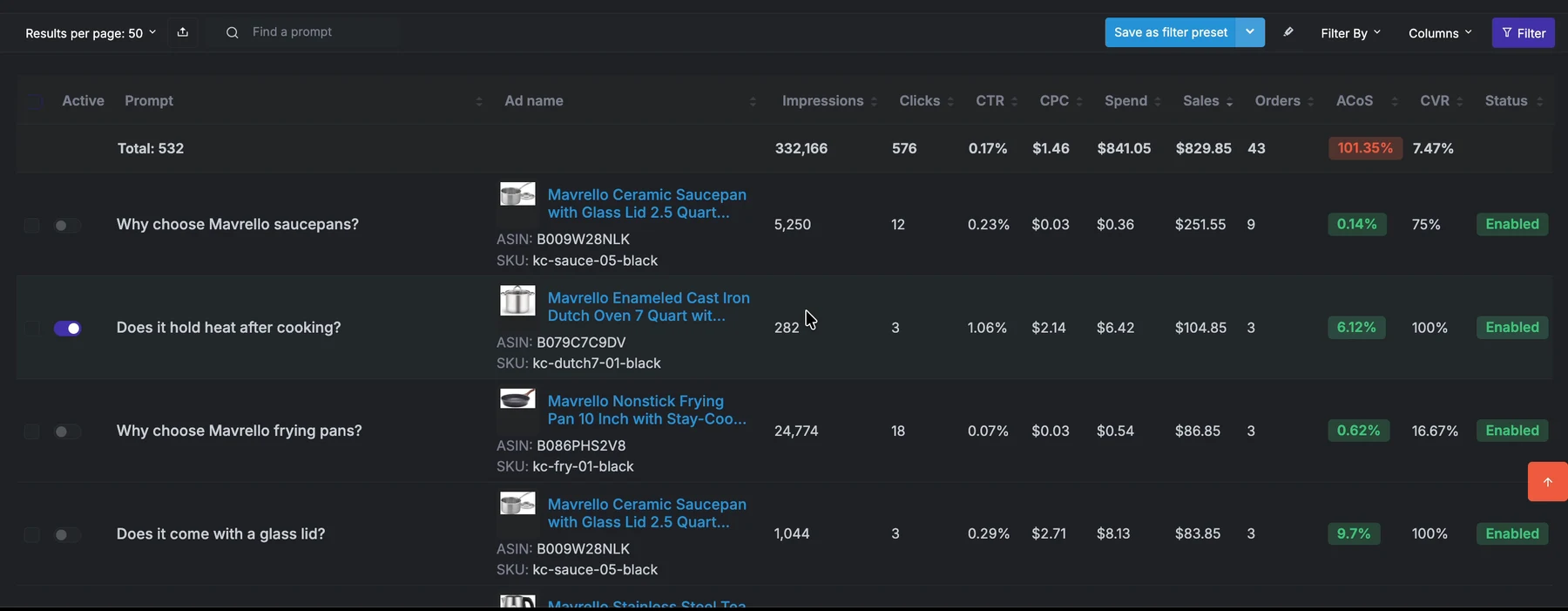
Every prompt with its numbers, ACoS and status. UNITIX Soft demo workspace; sample data.
Bulk actions. Every row has its own switch. To change many at once, select the rows and use Enable or Pause. Put together with the choice of level, that means finding the prompts that spend without orders across all campaigns and pausing them in one step, instead of visiting each ad group.
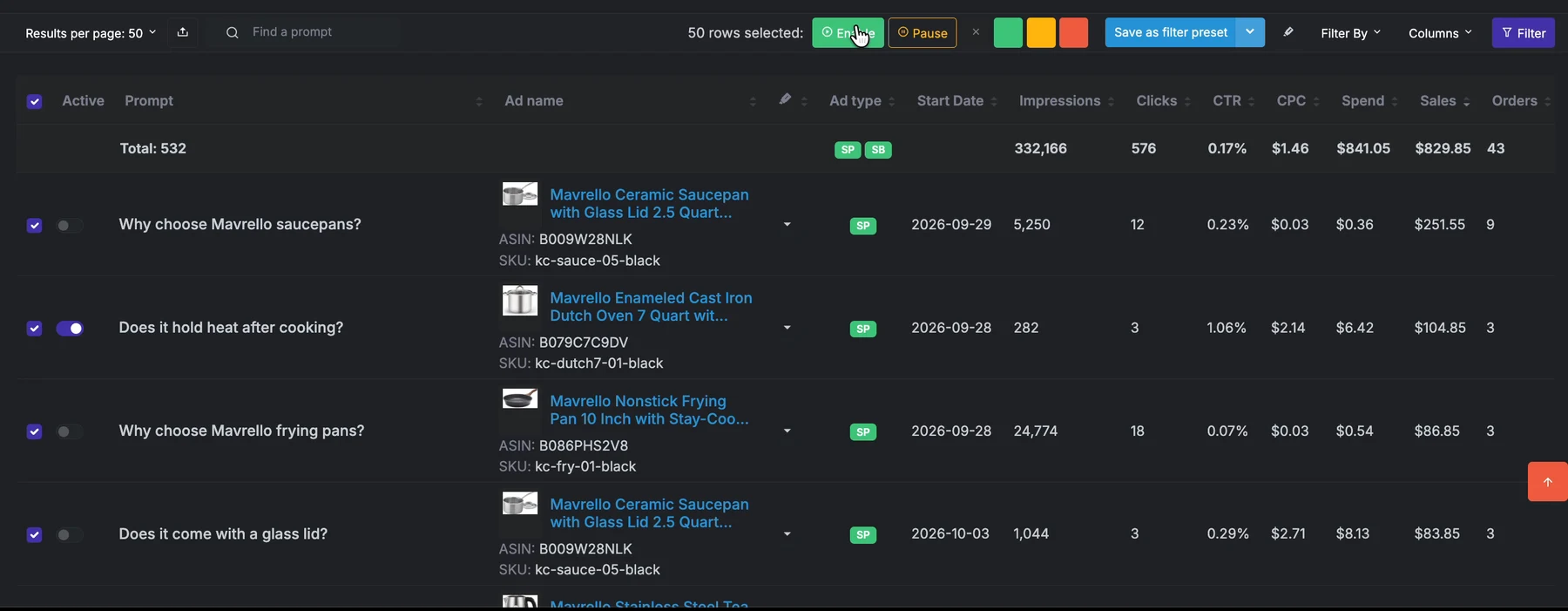
Bulk actions: select rows, then Enable or Pause. UNITIX Soft demo workspace; sample data.
Here is one row from the demo workspace. The prompt "Does it hold heat after cooking?" on a cast iron Dutch oven had 282 impressions, 3 clicks, a CTR of 1.06% and a CPC of $2.14. It spent $6.42 and brought $104.85 in sales from 3 orders, an ACoS of 6.12%. The numbers are sample data, but the decision is real: a prompt like this stays on, and one that collects clicks without orders is a candidate for Pause.
UNITIX Soft
See your own prompts at any level
Connect an account to UNITIX Soft to view every Sponsored Products and Sponsored Brands prompt with its spend, sales and ACoS, and pause the ones that do not pay back in bulk.
Explore UNITIX SoftBook a demoSources
- Amazon Ads, Sponsored Products prompts and Sponsored Brands prompts: advertising.amazon.com
- Amazon Ads, What agentic shopping means for advertising, 11 June 2026: advertising.amazon.com
- Amazon Ads, Introducing Branded Conversations and Review Requests, 29 September 2026: advertising.amazon.com
UNITIX Agency builds UNITIX Soft and uses it on the accounts it manages through Amazon PPC management.
Common questions
What are Sponsored Products and Sponsored Brands prompts?
AI-powered conversational ads that Amazon adds to existing Sponsored Products and Sponsored Brands campaigns. They show clickable product information or frequently asked questions in shopping results and on product detail pages. A click opens a conversation with Alexa for Shopping or answers on the page where the prompt appeared.
Who writes the prompt text?
Amazon. Prompts are built from Amazon's first-party signals, including your detail pages, Brand Store and campaign data. There is no setup step: campaigns are enrolled automatically and prompts use their existing targeting.
Do prompts cost money?
Yes. Since general availability on 25 March 2026, Amazon charges for prompt clicks as part of your CPC bidding and billing parameters.
Where are prompts available?
In the United States, for advertisers running Sponsored Products and Sponsored Brands campaigns, excluding authors and publishers. Open beta started in November 2025.
Do prompts work?
Amazon reports that in early testing nearly 20% of shoppers who interact with a Sponsored Brands prompt continue the conversation about that brand, and that adding prompts to a Sponsored Brands ad drives a 6% increase in conversions. Amazon has not published how either figure was measured.
How do I disable Amazon prompts, and can I pause them in bulk?
Amazon lets you pause any prompt at any time with its switch in the Prompts tab of the Ads Console, or through the API. Amazon's prompt documentation does not describe a bulk pause in the console. In UNITIX Soft you can enable or pause prompts one at a time, or select many rows across the account, a portfolio or a campaign and pause them together.
How can I see all Amazon prompts in one place?
In the Amazon Ads console the Prompts tab is inside each ad group. For the whole account Amazon offers the Prompts report, a file you create under Reports. UNITIX Soft shows every Sponsored Products and Sponsored Brands prompt in one live table, for the whole account, one portfolio or one campaign, with statistics kept for the whole period.
Can I manage Amazon prompts through the API?
Amazon says prompts can be reviewed and managed in the Ads Console or via API. Its announcement does not list the specific endpoints, so check the Amazon Ads API documentation before building on it.
How do I measure Amazon prompts performance?
Judge a prompt on spend, clicks, orders, sales and ACoS over a long enough period. In the console, a Prompts tab at the ad level (campaign, ad group, ads) lists prompts once they have received a click. A Prompts report under Sponsored Products gives prompt text, associated ad, impressions, clicks, CTR, CPC, spend, sales, ACOS, ROAS, and 7-day orders and units. UNITIX Soft adds conversion rate and status per prompt in the same table and keeps the statistics for the whole period, where Amazon's console tab shows prompts with clicks in the last 65 days.
What is the difference between Amazon prompts and Branded Conversations?
Prompts are written by Amazon from your listing, Brand Store and campaign data, and already run on Sponsored Products and Sponsored Brands campaigns. Branded Conversations are Amazon's next step for Sponsored Brands prompts: brands add their own expertise, such as what sets them apart and how products go together, to Alexa for Shopping conversations. They are marked as Sponsored and are due to launch in the United States in January 2027.
How does UNITIX Soft help manage prompts?
In the Amazon console prompts are viewed ad group by ad group. UNITIX Soft shows them at any level, account, portfolio or campaign, in one table with impressions, clicks, CTR, CPC, spend, sales, orders, ACoS, CVR and status, and enables or pauses many prompts at once.
Published by UNITIX Agency, an Amazon growth agency and an Amazon Ads Verified Partner. More at unitix.pro/insights.
Check your own product
ASIN Inspector
Paste an ASIN or an Amazon product link. You get the price and Buy Box, rank and how it has moved, ratings, images and video, and the search terms the product is clicked on. Free, and it needs no access to your account.