
Amazon audience bid adjustments: up to 10 audiences per Sponsored Products campaign
A US Sponsored Products campaign can now raise its bid for up to 10 audiences, each with its own percentage. How audience bid adjustments work, how they combine with placement boosts, where Amazon shows them, and a new way to manage them across campaigns in UNITIX Soft.
By Mariya Tkach, Head of Marketing and Growth, UNITIX Agency
See more UNITIX in Google
Add UNITIX to your Preferred Sources.
Since September 2026 a Sponsored Products campaign in the US can raise its bid for up to 10 audiences at once, each with its own percentage. Until then it was one. Outside the US the limit is still one audience per campaign, and Sponsored Brands campaigns still take one.
Short answer. An audience bid adjustment raises your bid when the shopper belongs to an audience you chose: shoppers who added your product to cart, past buyers of your brand, an in-market segment, or a custom audience from Amazon Marketing Cloud. Each of the 10 audiences gets its own boost. If a shopper is in several, only the highest boost applies, and it combines with any placement boost. You set audiences in the Amazon console campaign by campaign, or in UNITIX Soft across many campaigns in one step.
What an audience bid adjustment does
It does not decide who sees the ad. The ad still has to match a keyword or a product target. The audience changes how much you are willing to pay for that click when the shopper searching belongs to a group you value more.
Amazon describes it as a way "to help drive discovery and sales for specific groups of shoppers". When the shopper is a member of one of your selected audiences, your bid increases by the percentage you set for that audience.
What changed: 10 audiences per campaign
Amazon expanded Sponsored Products audiences in September 2026. Its help page for Sponsored Products bids now reads: "Select up to 10 audiences per campaign, each with an independent bid boost percentage." It adds a note: advertisers outside the US marketplace can only select up to 1 audience at this time. If the option has not reached your ad account yet, the campaign still takes one.
With one audience, a campaign could favour one group of shoppers. With ten, the same campaign can carry a different boost for each group, for example a higher one for shoppers who clicked or added the product to cart and a lower one for an in-market segment.
| Sponsored Products | Sponsored Brands | |
|---|---|---|
| Audiences per campaign, US | Up to 10 | 1 |
| Audiences per campaign, other marketplaces | 1 | 1 |
| Audience types | Built by Amazon, AMC custom | Built by Amazon or AMC, not both |
| Highest adjustment you can enter | 900% (10x the base bid) | 900% (10x the base bid) |
The two kinds of audiences
Audiences built by Amazon. Prebuilt segments informed by Amazon's first-party shopping and streaming signals: in-market, lifestyle, interests and life events. They are available to all advertisers. In the console you will see names such as Purchased brand's product, Clicked or Added brand's product to cart, and High likelihood to purchase based on recent shopping activity. Sponsored Brands also offers New-to-brand shoppers.
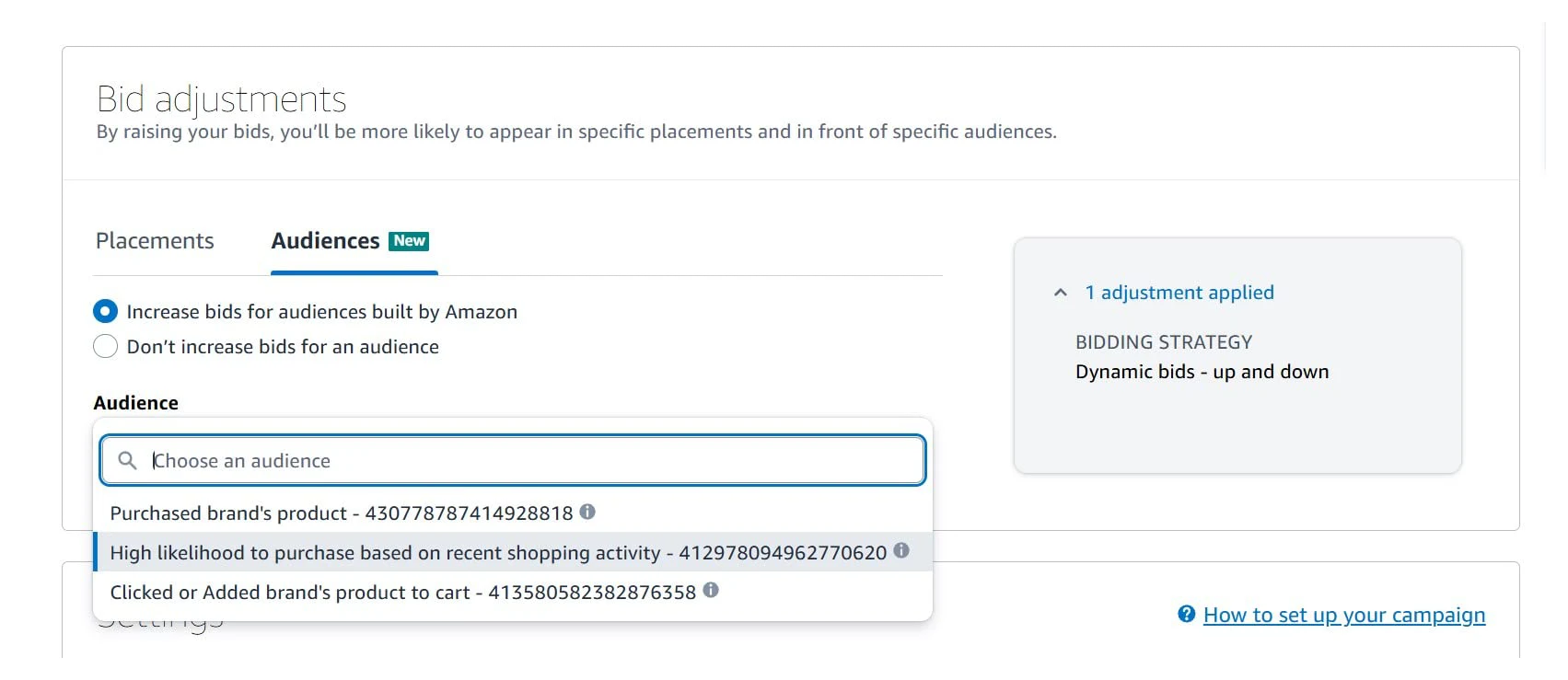
Choosing an audience built by Amazon when creating a Sponsored Products campaign. Image: Amazon Ads.
Amazon Marketing Cloud custom audiences. Audiences you build in AMC from engagement signals across your Amazon Ads media, rule-based or lookalike. Once created for sponsored ads, an AMC audience can be used in Sponsored Products and Sponsored Brands bid boosts. You need an AMC account to build them.
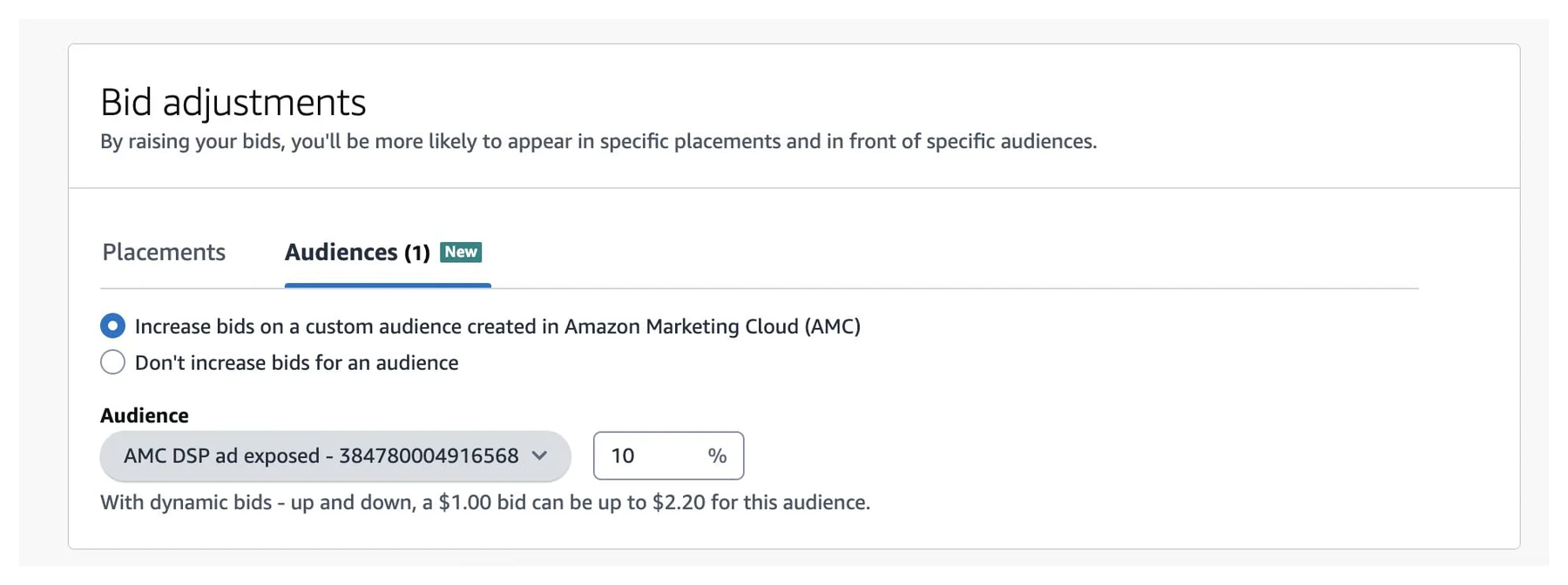
An AMC custom audience with a 10% bid adjustment. Image: Amazon Ads.
How the bid is calculated with several audiences
Three rules from Amazon's help page:
- Only the highest audience boost applies. Boosts do not stack across audiences. A shopper in two of your audiences gets the larger of the two.
- A tie is random. If two boosts are equal, the impression is attributed to either audience at random.
- Attribution goes to the winner. It is assigned to the winning audience at impression time and is not split.
Different types of adjustments do stack. Amazon's example: a $1.00 bid on the keyword "camera", a 50% top of search boost, a 30% boost for one audience and a 60% boost for another. A shopper in both audiences searches "camera" and the ad is eligible for top of search:
- $1.00 bid + 50% top of search = $1.50
- $1.50 + 60% audience boost, the highest one wins = $2.40
- the 30% boost does not apply
A Sponsored Products video boost can join in as well. In Amazon's second example, $1.00 with 50% rest of search, a 50% custom audience boost and a 100% video boost ends at $4.50.
Because the boosts multiply, a modest audience percentage on a campaign that already has a large placement boost can raise the final bid more than it looks.
Where to find audiences in the Amazon Ads console
When you create a campaign, the Bid adjustments card has two tabs, Placements and Audiences. On Audiences you choose between audiences built by Amazon and an AMC custom audience, pick the audience and enter a percentage.
Once the campaign is live, open it in the campaign manager and go to Bid adjustments, then Audiences. The table lists each audience with its bid adjustment, impressions, clicks, CTR, spend, CPC, orders and sales, next to the campaign total. Change audience edits the selection.
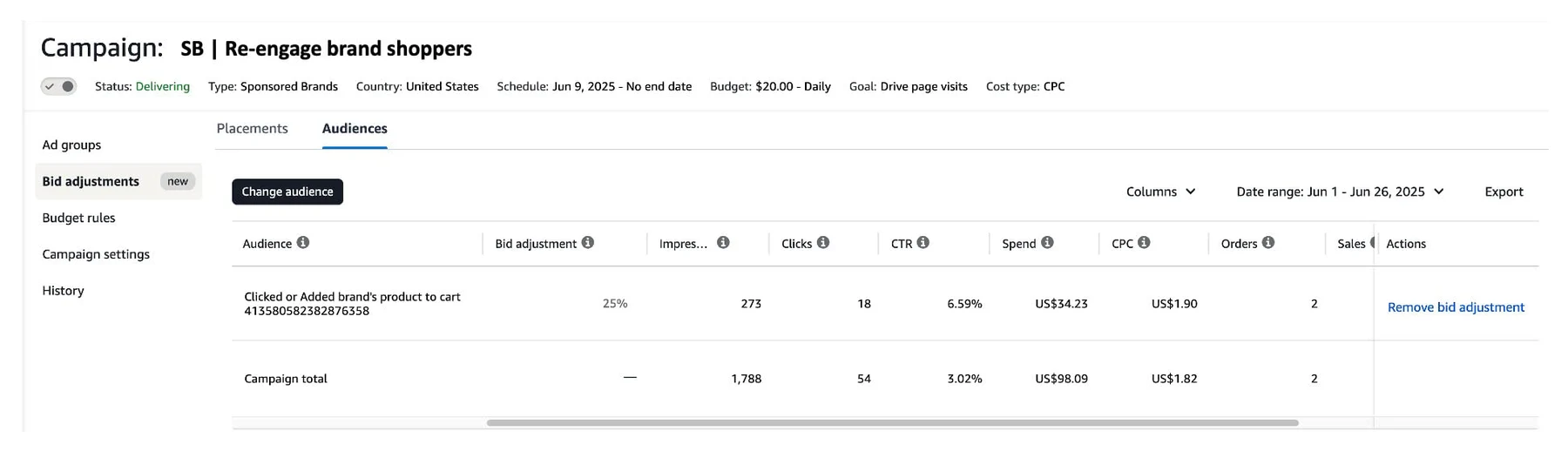
The Audiences table inside one campaign. Image: Amazon Ads.
Under the table Amazon notes that "the campaign performance numbers shouldn't be added together". The audience overlaps with the campaign total, and audiences may overlap with each other.
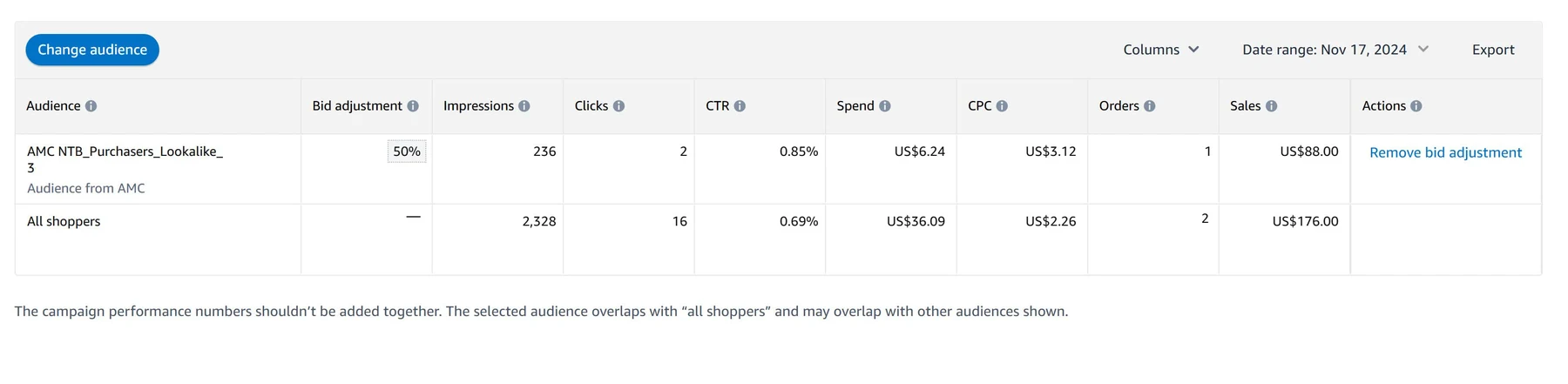
Audience performance next to all shoppers in the campaign. Image: Amazon Ads.
So the view is per campaign. On an account with dozens of campaigns, seeing how one audience performs everywhere, or giving the same audiences to fifteen campaigns, means opening them one by one.
UNITIX Soft
Manage audience bids across your campaigns
See every audience's numbers for the whole account, and add or change audience bids on many Sponsored Products and Sponsored Brands campaigns in one step, with a preview first.
Explore UNITIX SoftHow audience bidding got here
| Date | What Amazon launched |
|---|---|
| 15 October 2024 | Audience bid boosting for Sponsored Products and Sponsored Brands with AMC custom audiences, announced at unBoxed |
| 4 November 2024 | The audience bid adjustment tab and an audience report in the Ads Console for Sponsored Products |
| 30 April 2025 | Audiences built by Amazon in Sponsored Products, for all advertisers |
| 26 August 2025 | Two more Amazon-built audiences for Sponsored Brands, next to New-to-brand shoppers |
| September 2026 | Up to 10 audiences per Sponsored Products campaign in the US |
Control sits in the Ads Console, the Amazon Ads API, or UNITIX Soft, which works with the same audiences and the same limits across many campaigns at once.
What Amazon says about results
Amazon has published two figures, both for Sponsored Brands and both from August 2025:
- Advertisers that increased bids for "Clicked or Added brand's product to cart" saw an average improvement in conversion rate of 16.3% versus clicks in the same campaign outside the audience.
- Advertisers that increased bids for "Purchased brand's product" saw an average improvement of 24.9%.
Amazon labels both "Amazon internal data, WW, May-June 2025". They compare clicks inside and outside the audience in the same campaign, so they describe how those shoppers convert, not what a boost will add to your account.
What to check before raising a boost
- Read the audience next to the campaign total. An audience worth a higher bid converts better than the campaign as a whole. If it does not, the boost buys the same clicks at a higher price.
- Remember the overlap. With several audiences, a shopper who is in two gets only the higher boost, and the result is credited to that audience alone. A low boost on a large audience can look weak simply because a higher one wins its shoppers.
- Check the placement boost. The audience percentage multiplies the bid after the placement adjustment, so read them together.
- Give it time. A new audience on a small campaign may collect few impressions. Amazon notes that an audience may see zero or reduced delivery if it is too small to serve.
Amazon Ads console vs. UNITIX Soft: audience management
Amazon's console, its reports and its API each cover part of the job. This compares them with UNITIX Soft on what each is documented to do.
New in UNITIX Soft: Audiences, across campaigns
This is the part the console makes slow, so we built it into UNITIX Soft. The Audiences section sits in Advertising, next to Placements and Prompts.
The Audiences section in UNITIX Soft. Screen recording of the demo workspace; every figure is sample data, not a client account.
Every audience, with its numbers. Audience statistics now appear on the main dashboard of UNITIX Soft, and in Advertising the audience performance summary lists each audience used in the account with its average bid adjustment, impressions, clicks, CTR, CPC, spend, sales, orders, ACoS, ROAS and conversion rate, and a total row that shows how each metric moved. One switch moves between Sponsored Products and Sponsored Brands, and the portfolio, campaign and date filters narrow it.
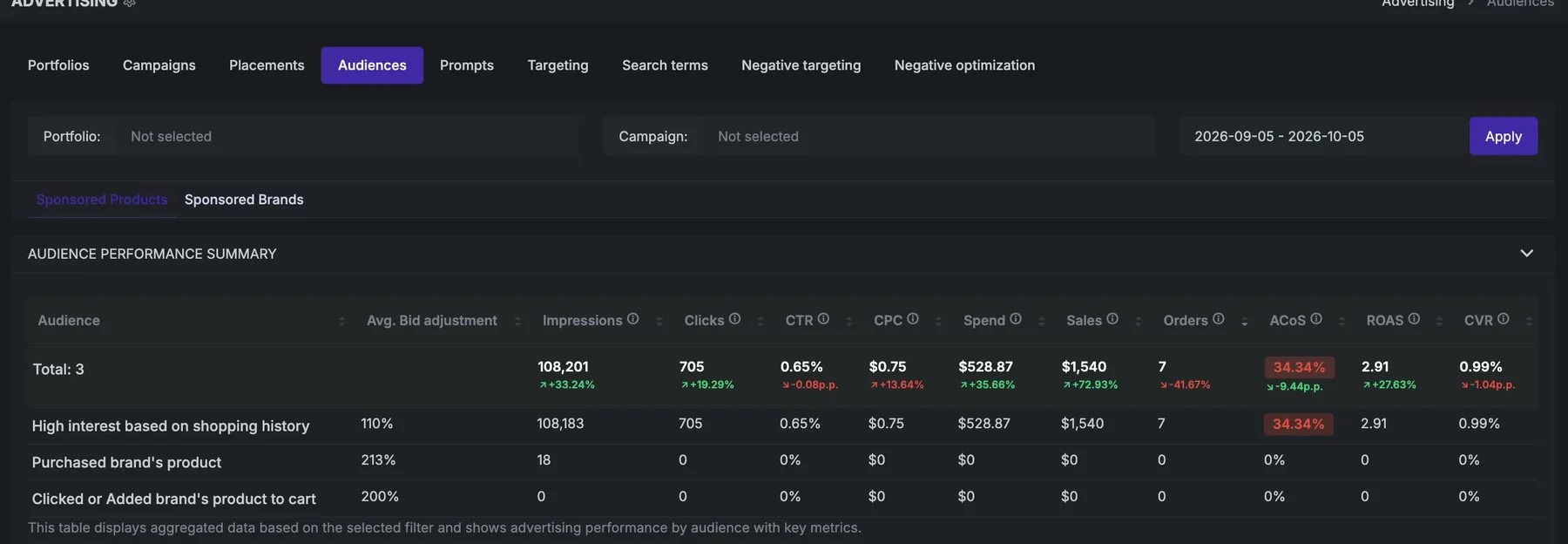
The summary by audience for the whole account. UNITIX Soft demo workspace; sample data.
Every campaign, with its audiences. Below the summary, each campaign is a row and its audiences sit under it, each with its bid adjustment, audience history and the same metrics. The pencil changes one percentage in place.
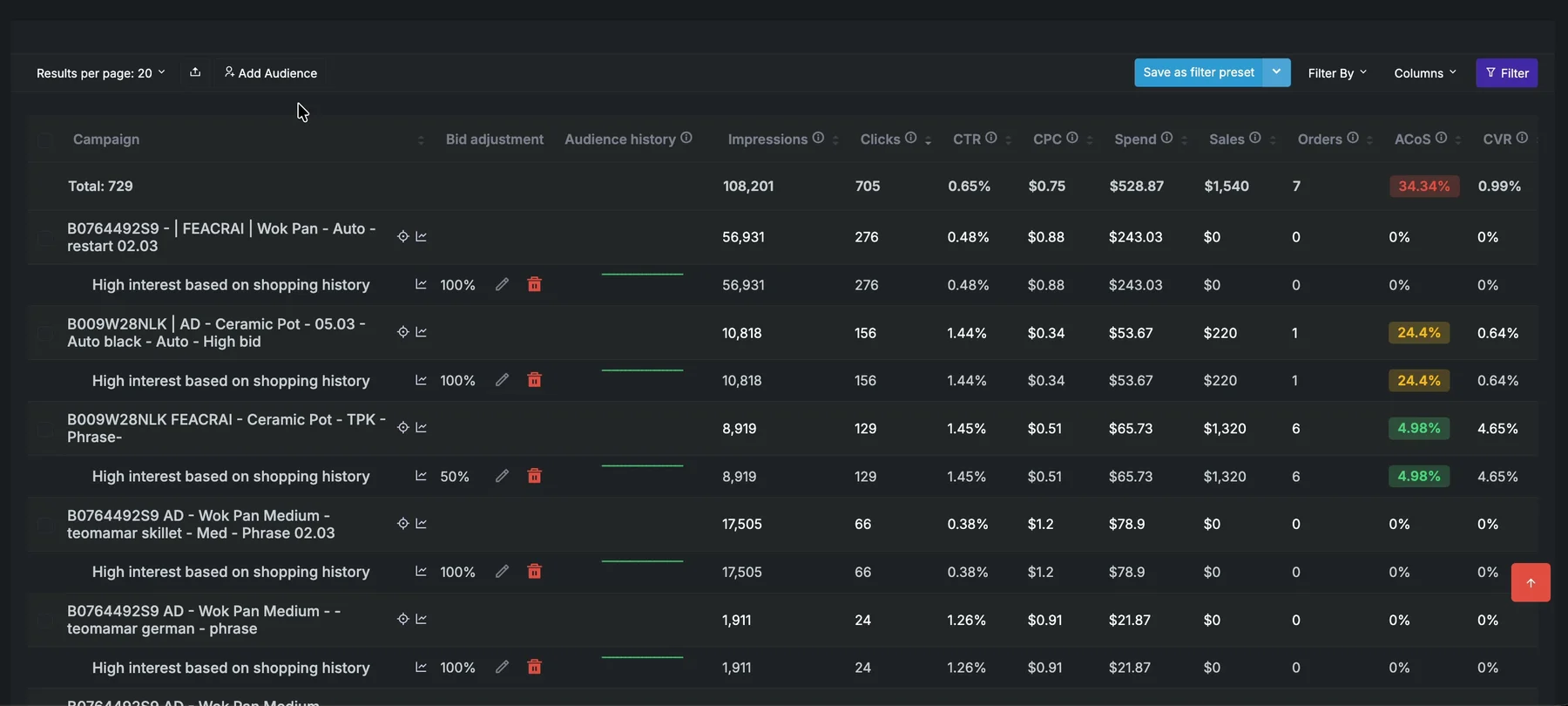
Campaigns with their audiences and bids. UNITIX Soft demo workspace; sample data.
Bid adjustments, one at a time or in bulk. Select campaigns and use Adjust audience to set a new percentage for all of them. Add Audience adds audiences to several campaigns at once: choose audiences built by Amazon or an AMC custom audience, narrow the campaigns by portfolio, status and whether they already have an audience, add several audiences with a percentage each, and apply them to every selected campaign.
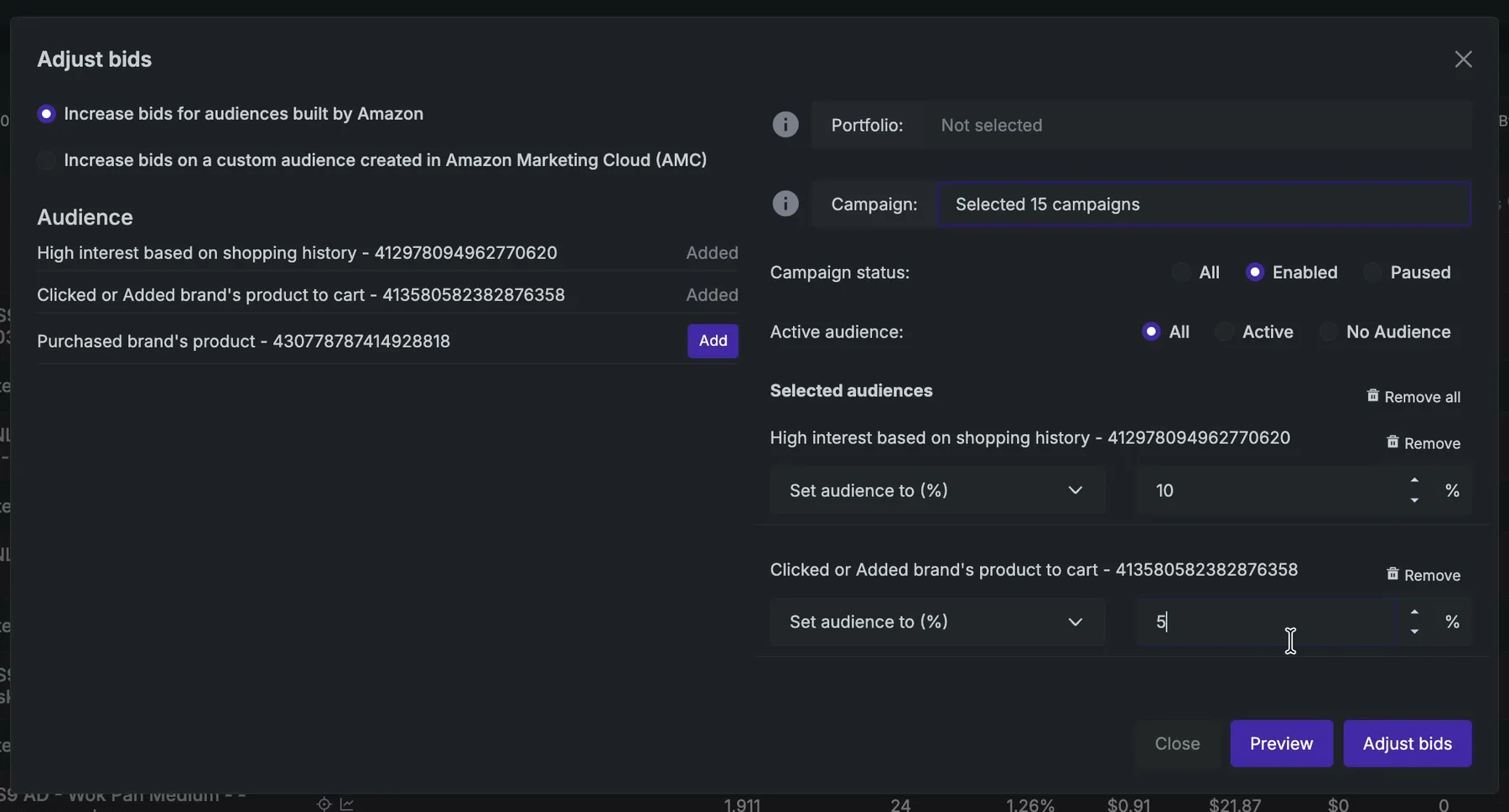
Two audiences with their own bids, for 15 campaigns at once. UNITIX Soft demo workspace; sample data.
A preview before anything changes. Preview lists every campaign with its current audience and bid next to the new ones. Each campaign can be unticked before Adjust bids applies the change.
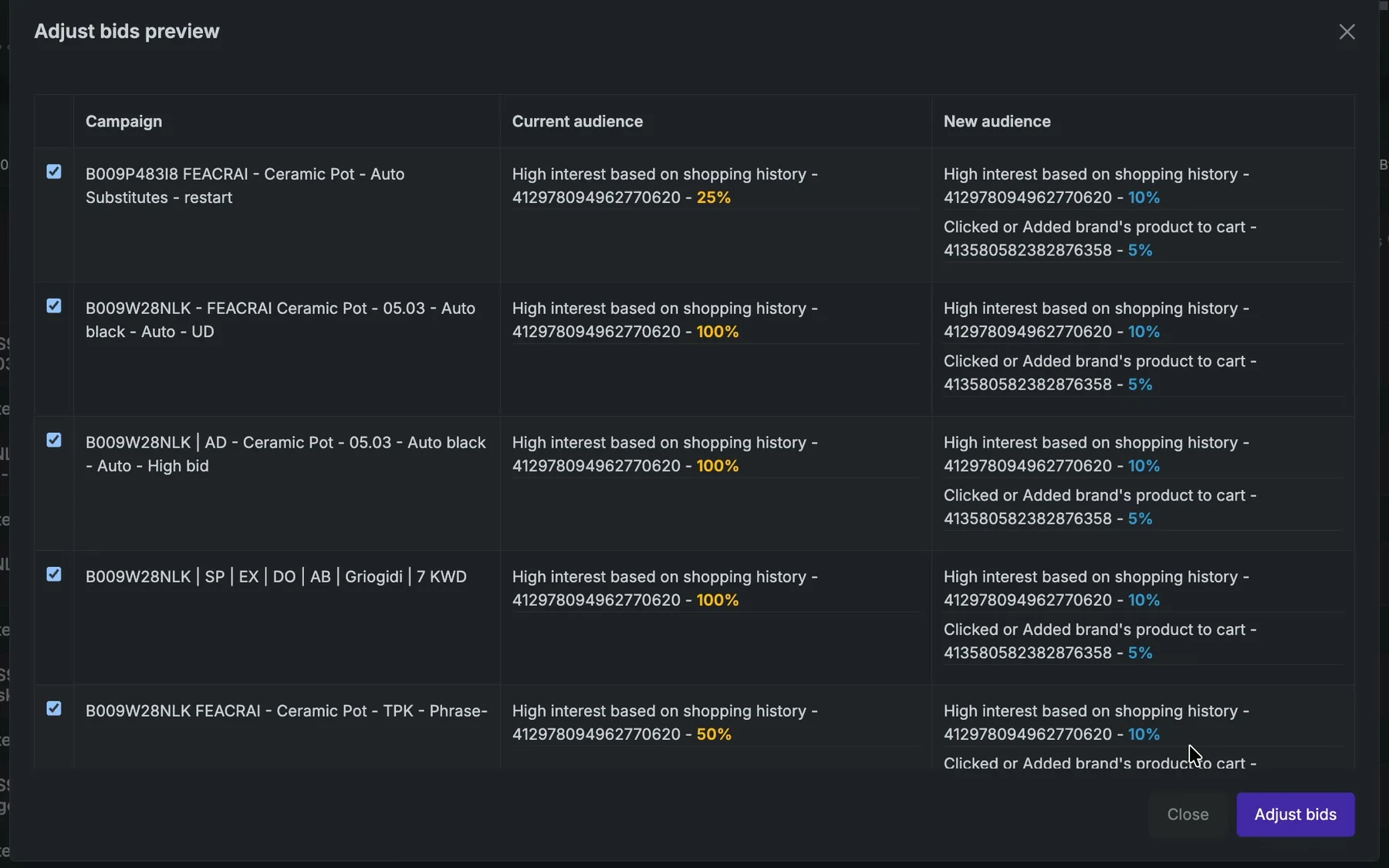
Current and new audiences, campaign by campaign. UNITIX Soft demo workspace; sample data.
If the 10-audience option is already available in your Amazon ad account, you can use it in UNITIX Soft as well.
Here is one row from the demo workspace. A phrase campaign for a ceramic pot carried the audience "High interest based on shopping history" at a 50% bid adjustment. For that audience it had 8,919 impressions, 129 clicks and a CTR of 1.45%, spent $65.73 at a CPC of $0.51 and brought $1,320 in sales from 6 orders: an ACoS of 4.98% and a conversion rate of 4.65%. The numbers are sample data, but the reading is real: an audience converting like this is a candidate for a higher boost, and one that spends at a worse ACoS than its campaign is a candidate for a lower one.
UNITIX Soft
Put your audiences to work across campaigns
Connect an account to UNITIX Soft to see every audience's spend, sales and ACoS, and set audience bids on many campaigns in one step.
Explore UNITIX SoftBook a demoSources
- Amazon Ads help, Adjust Sponsored Products bids, updated 28 September 2026: advertising.amazon.com
- Amazon Ads help, Sponsored Brands bids by placement and audiences: advertising.amazon.com
- Amazon Ads, Increase engagement through audience bid boosting, 15 October 2024: advertising.amazon.com
- Amazon Ads, Increase efficiency of campaigns with Amazon Built Audiences in SP, 30 April 2025: advertising.amazon.com
- Amazon Ads, Introducing new audiences for bid adjustment for Sponsored Brands, 26 August 2025: advertising.amazon.com
UNITIX Agency builds UNITIX Soft and uses it on the accounts it manages through Amazon PPC management.
Common questions
What is an audience bid adjustment on Amazon?
A percentage that raises your bid when the shopper belongs to an audience you selected. The ad still has to win on its keyword or product targeting; the audience only changes how much you bid for that shopper. Amazon calls it audience bid boosting.
How many audiences can a Sponsored Products campaign have?
Up to 10 per campaign in the US marketplace, each with its own bid boost percentage. Outside the US, advertisers can select only 1 audience at this time. Sponsored Brands campaigns take 1 audience per campaign, either built by Amazon or from Amazon Marketing Cloud, not both.
What happens if a shopper is in more than one of my audiences?
Only the highest audience boost applies. Boosts do not stack across audiences. If two boosts are equal, Amazon attributes the impression to either audience at random, and the attribution goes to the winning audience at impression time without being split.
Do audience and placement bid adjustments add up?
Yes, adjustments of different types apply together. In Amazon's example a $1.00 bid with a 50% top of search boost becomes $1.50, and the winning 60% audience boost takes it to $2.40. A Sponsored Products video boost can apply on top as well.
What is the maximum audience bid adjustment?
Amazon's help pages give a 900% increase, 10 times the base bid, as the most you can enter.
Which audiences can I use?
Two types. Audiences built by Amazon are prebuilt segments from first-party shopping and streaming signals, such as in-market, lifestyle, interests and life events, and are available to all advertisers; examples include Purchased brand's product and Clicked or Added brand's product to cart. Amazon Marketing Cloud custom audiences are built in AMC by advertisers who use it.
Where are audience bid adjustments in the Amazon Ads console?
On the Bid adjustments card when you create a campaign, and in the campaign manager under the campaign's Bid adjustments tab, where an Audiences table shows each audience's performance next to the campaign total and Change audience edits it.
Can I set audiences on many campaigns at once?
Amazon's audience help pages describe the setting per campaign. In UNITIX Soft you select the campaigns, or a portfolio, add one or more audiences with a percentage each, check the preview of current and new audiences, and apply it to all of them in one step.
How does UNITIX Soft help manage audiences?
Audience statistics appear on the main dashboard, and the Audiences section in Advertising shows a summary by audience across the account or the selected filters and every campaign with its audiences and bids, for Sponsored Products and Sponsored Brands. A bid can be edited in place, the selected campaigns can be adjusted together, audiences can be added to several campaigns at once, and every bulk change has a preview first. If the 10-audience option is available in your Amazon ad account, it works in UNITIX Soft too.
Published by UNITIX Agency, an Amazon growth agency and an Amazon Ads Verified Partner. More at unitix.pro/insights.
Check your own product
ASIN Inspector
Paste an ASIN or an Amazon product link. You get the price and Buy Box, rank and how it has moved, ratings, images and video, and the search terms the product is clicked on. Free, and it needs no access to your account.