
Rufus became Alexa for Shopping. Little else did
Amazon retired the Rufus name on 13 May 2026 and folded the assistant into Alexa. Three months on, here is what a seller actually has to do differently, which is less than the coverage suggested.
By Alex Tkach, CEO & Co-Founder, UNITIX Agency
See more UNITIX in Google
Add UNITIX to your Preferred Sources.
On 13 May 2026 Amazon retired the name Rufus. The shopping assistant is now called Alexa for Shopping, it carries Alexa's branding, and it shares context with the rest of Alexa.
The coverage read like a product launch. We went and looked at the live site three months later. What changed is the name, the doorway and the memory. What a product page has to say for the assistant to consider it did not change at all.
What actually changed
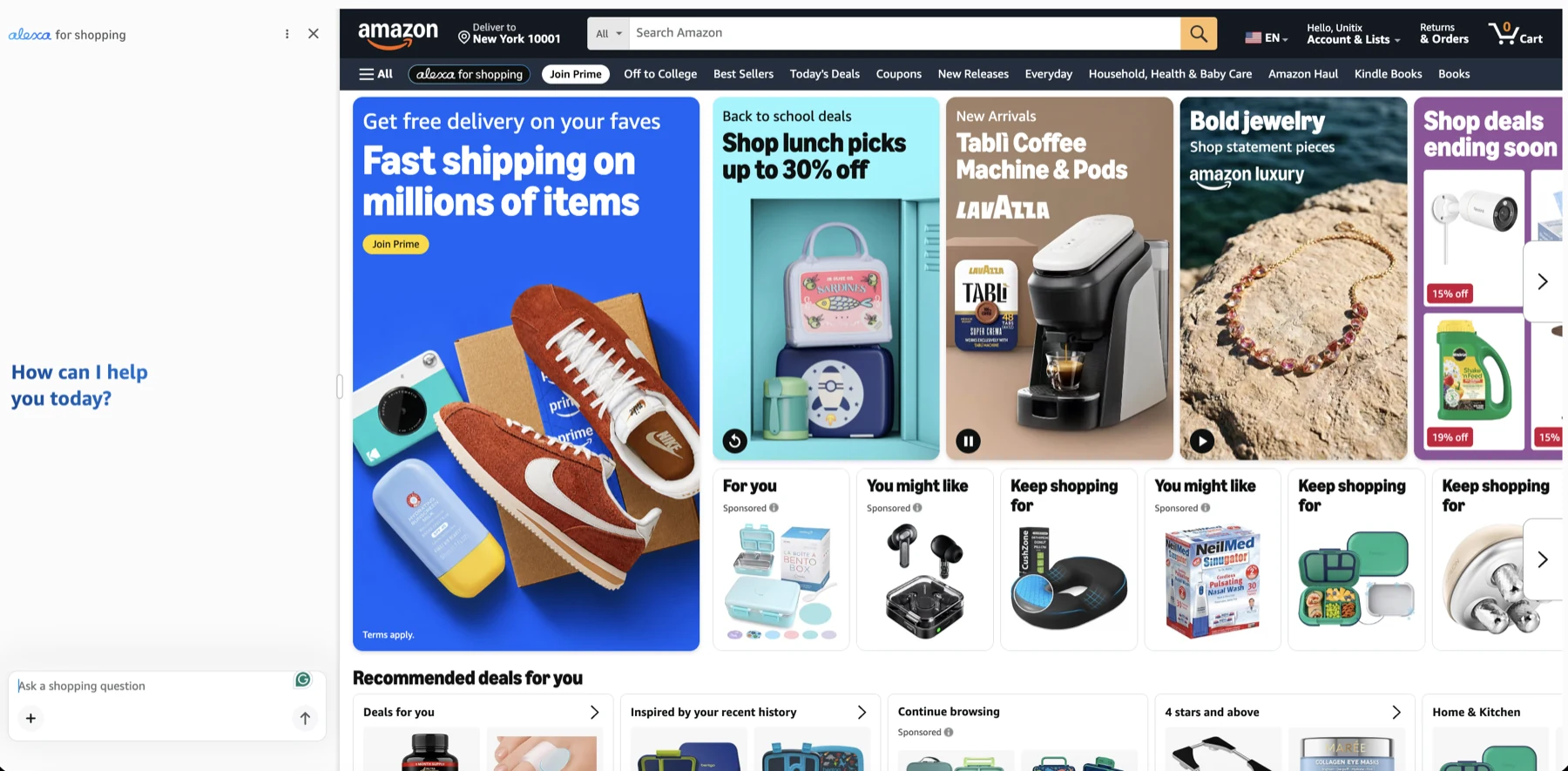
The name, and the badge. Rufus is gone as a brand. In its place, in the second row of the
Amazon navigation, sits an alexa for shopping pill in Alexa's own lettering, next to All
and before Join Prime.

Worth noting, because much of the coverage said otherwise: the assistant did not move into the search bar. The search field still reads Search Amazon and still takes keywords. The assistant is a separate entrance beside it.
Where it opens. Click the pill and it opens as a panel down the left side of the page,
with the shop still visible next to it. It is not a modal you dismiss to get back to
shopping. The prompt is Ask a shopping question, and it stays open while you browse.
What it remembers. This is the change with a real consequence. Asked for a leakproof water bottle for a child, the assistant opened with since you're already loving the Bentgo Chill Lunch Box, and picked bottles to pair with it.
Nobody told it that in the question. It carried the context over from the product being looked at, and it reasoned across two products in different categories.
That is the shift worth planning for. A product is no longer only being matched to a query. It is being matched to a shopper the assistant already knows something about.
What did not change
The part sellers keep asking about. What the assistant reads, and what a listing has to contain to be treated as a relevant answer.
The answers themselves show it plainly. Asked whether a lunch box fits a school backpack side pocket, the assistant answered with the stated dimensions, 8.9 by 6.5 by 2 inches, and then with what buyers had written: customers specifically mention that it fits perfectly in kid's backpacks.
Catalogue facts and review language. The same two sources it drew on under the old name, and the same two a listing either supplies or does not.
Amazon still has not published which fields carry what weight, before the rename or after. Nobody outside Amazon knows, and an agency telling you otherwise is guessing in a confident voice.
So the work is the same work it was in April. State the facts. Fill the structured attributes. Answer the questions your buyers actually ask instead of the adjectives your copywriter reached for. We wrote that out in full, with the answers themselves, in the piece on what a listing has to say, and the rename did not date a line of it.
Both names still matter
Two reasons to keep writing Rufus for a while yet.
Sellers search for it. The name had eighteen months to lodge, and the search demand did not transfer to the new one on the day of the announcement.
And the rename was announced for the United States, which is also where our screenshots come from. We found no equivalent announcement for other marketplaces, so a seller in Germany or the UK may still be looking at, and searching for, the older name. If you sell across regions, your internal documents should carry both until Amazon says otherwise.
What to do this week
Nothing urgent, which is the honest answer.
Rename it in your own documents so next year's reader is not confused. Then go back to the work that was already outstanding before May: the attributes nobody filled in, the use cases the listing never mentions, the compatibility that is implied and never stated.
That list did not get shorter when the assistant got a new name.
Published by UNITIX Agency, an Amazon growth agency and an Amazon Ads Verified Partner. More at unitix.pro/insights.
Check your own product
ASIN Inspector
Paste an ASIN or an Amazon product link. You get the price and Buy Box, rank and how it has moved, ratings, images and video, and the search terms the product is clicked on. Free, and it needs no access to your account.