
Amazon Ads has a new feature. It doesn't sell your product, it asks for a review
Amazon Ads is opening a new campaign type in beta: instead of bidding to sell a product, sellers pay for a native, in-app prompt that asks a verified buyer to leave a review. Here's what it actually does, in plain language.
By Alex Tkach, CEO & Co-Founder, UNITIX Agency
See more UNITIX in Google
Add UNITIX to your Preferred Sources.
Amazon Ads is opening a new kind of campaign in beta, and it's worth understanding because it doesn't work like the campaign types sellers already run. A Sponsored Products ad bids to get a product in front of a shopper. This one bids to get a review out of someone who already bought it.
The 30-second version
In plain words
A customer buys a product. At least 7 days after it's delivered, Amazon shows them a one-tap prompt, right on Amazon, asking them to rate it. If they engage, they can add a written review, a photo, or a video. The seller only pays when a shopper actually clicks through to leave that review, not just for the prompt being shown. The review that results is a completely normal, unlabeled, verified-purchase review, nothing marks it as ad-driven.
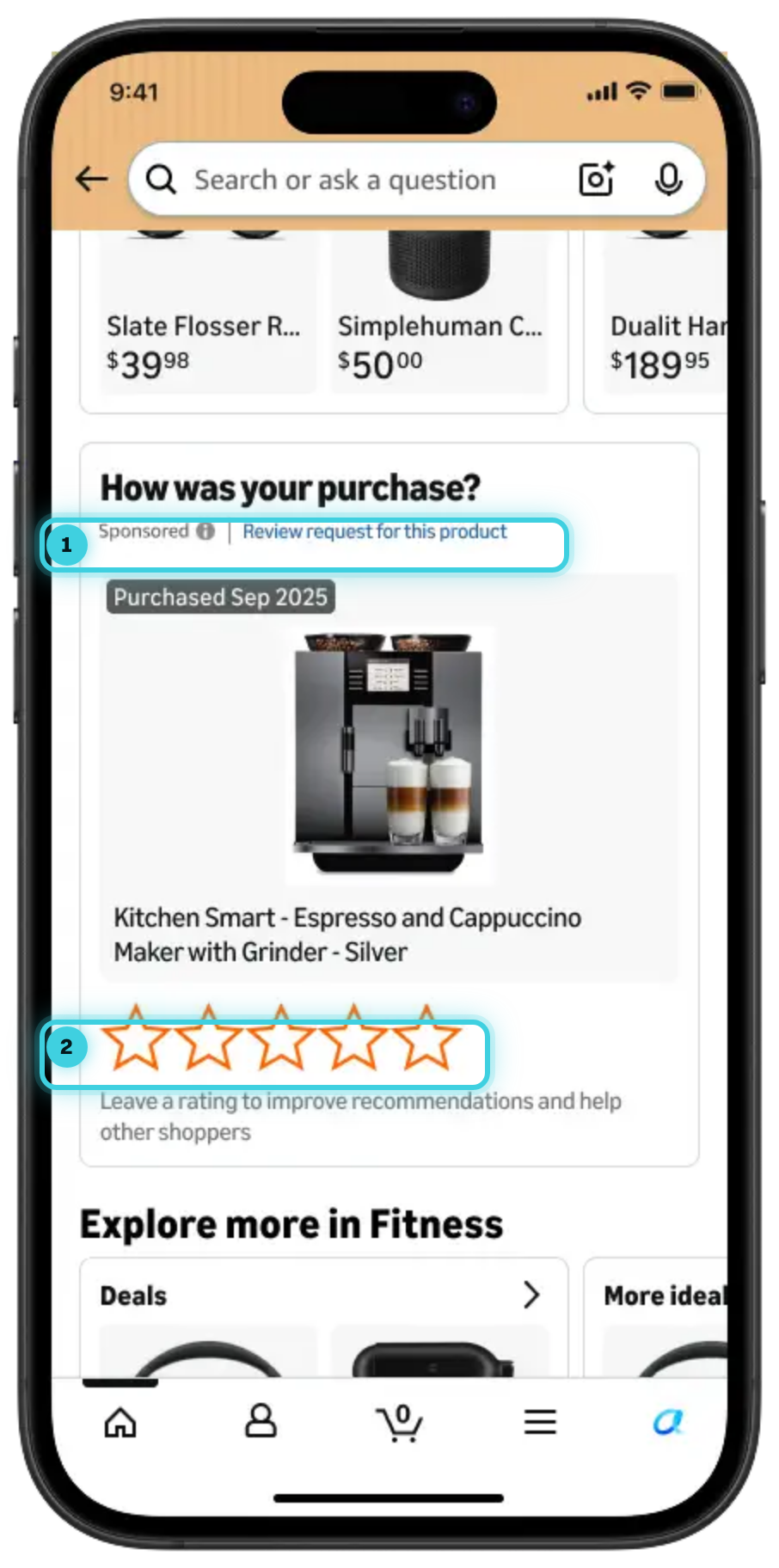
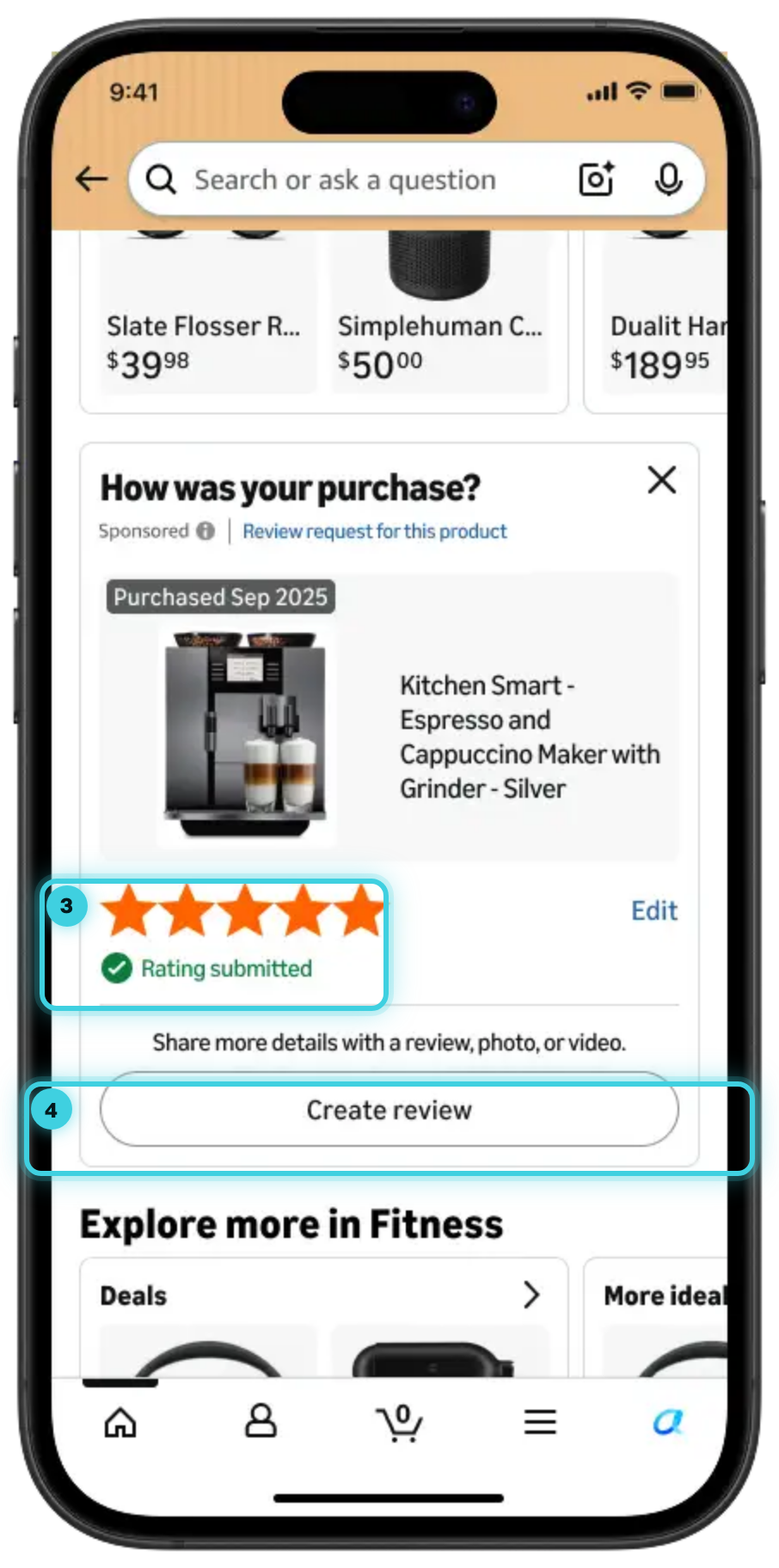
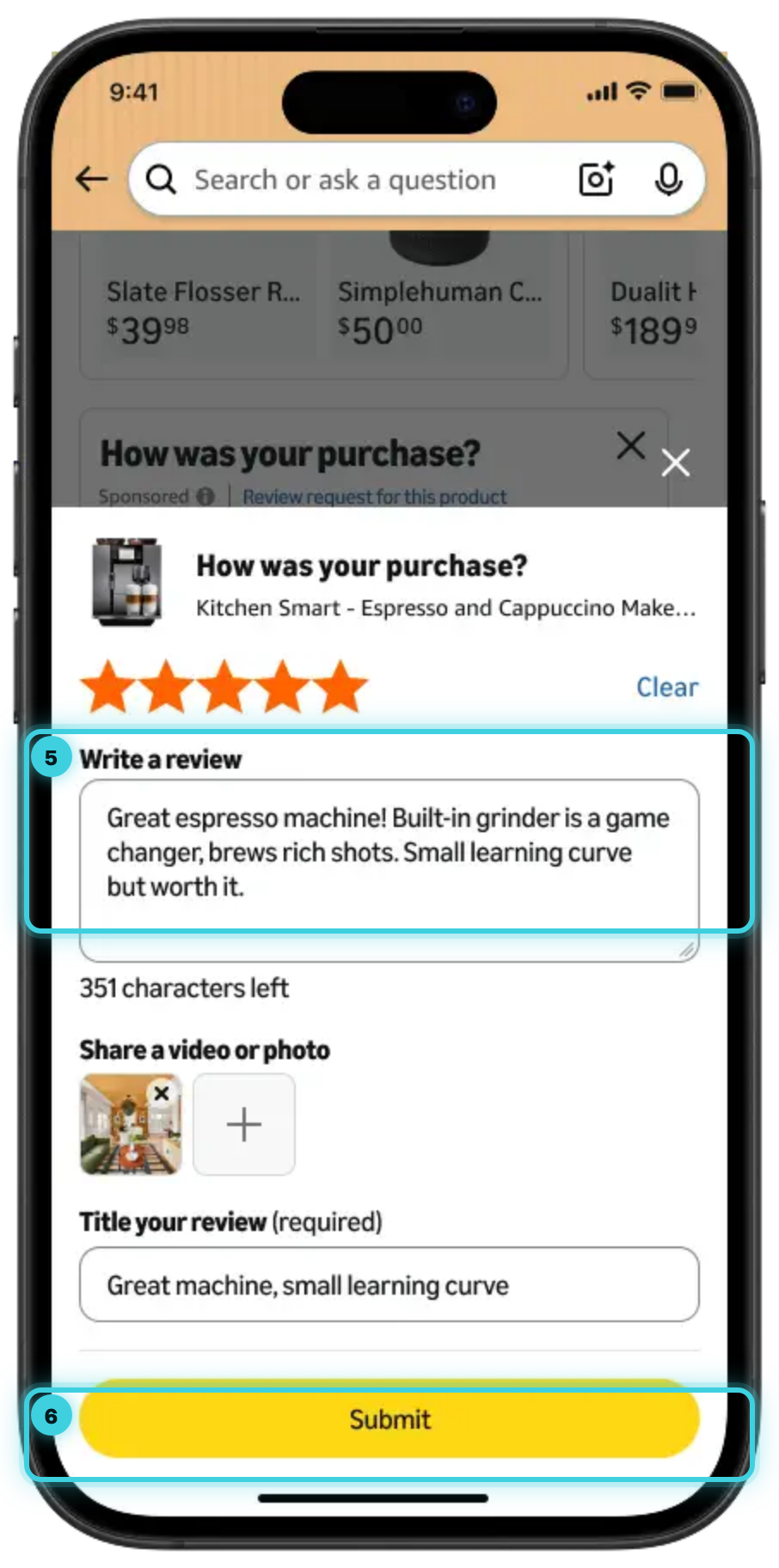
1 labelled as an ad, not hidden 2 still just a prompt 3 one tap, already submitted 4 everything after this is optional 5 the buyer's own words 6 the seller pays when this is pressed. The actual shopper-facing flow, highlights ours; images: Amazon Ads, published on its own "what's new" page.
What it actually is
Amazon's own description: Review Requests "reaches customers who recently purchased your product and invites them to submit a star rating or written review while they are shopping on Amazon." The prompt is native, meaning it appears inside Amazon itself (Amazon names the homepage as one placement), not as an email or a push notification from a third party. It's aimed only at verified purchasers, at least 7 days after delivery, which keeps it from showing up before someone has actually had the product in hand.
The interaction is deliberately short: one tap for a star rating, with a written review, photo, or video as an optional next step, not a requirement. Campaigns are created and managed through Amazon Ads Agent, using the same bidding and budget controls sellers already use for other Amazon Ads campaign types, and the feature is also reachable through the Amazon Ads Unified API.
What it costs
Review Requests bills on a cost-per-click basis, the same mechanic as Sponsored Products: the seller pays when a shopper clicks through to the review flow, not for the prompt simply being shown, and not a separate fee for the review itself being written or published. There's no flat per-unit enrollment fee the way Vine works.
In a demo campaign, the default bid was $0.75 and the default daily budget $100, Amazon's own starting-point defaults for a new campaign rather than a fixed or guaranteed price. Actual bids will move with competition for the ASIN, the same as any other Amazon Ads campaign.
Setting up a campaign
Campaign creation follows the same shape as other Amazon Ads products: pick the ASIN or ASINs, set a daily budget, and choose how long the campaign runs, through Amazon Ads Agent or the Amazon Ads Unified API, the same bidding and budget controls sellers already use elsewhere in Amazon Ads. The one real difference from a Sponsored Products campaign: there's no creative to build. The prompt uses the product's own catalog image automatically, so there's nothing to design or upload before launch.
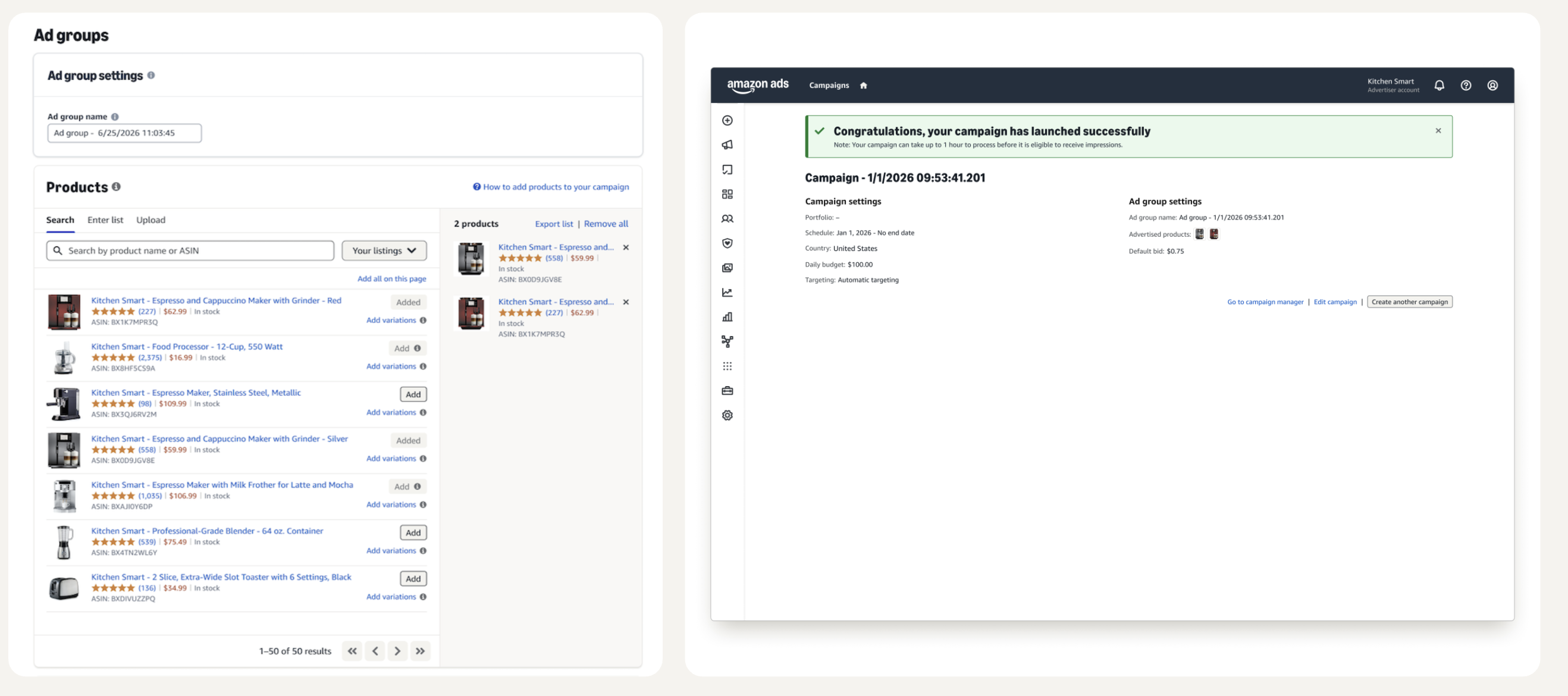
A campaign, right after launch: product selection on the left, the confirmation screen with its settings on the right.
How Amazon Ads Review Requests actually works
Five steps, from purchase to a normal review on the listing.
A real purchase, on Amazon, nothing to do with the ad yet.
Amazon waits until the buyer has actually had the product in hand.
Native, inside Amazon itself (the homepage is one placement), not an email.
One tap for stars; a written review, photo or video is optional.
Not for the prompt being shown. The review carries no special label.
Who qualifies
- The product needs fewer than 1,000 total ratings and reviews at the moment the campaign is created
- Amazon checks that continuously, so a campaign pauses automatically the moment a product crosses 1,000 reviews, it isn't a one-time check at setup
- The seller or vendor account needs to be in good standing, with no active policy violations
That 1,000-review ceiling is the whole point of the tool: it's built for products that still need reviews, not for an already-established bestseller topping up a number that's already working for it. Before running a campaign, it's worth knowing what those new reviews would actually do to the average: the rating calculator works out how many five-star reviews it takes to reach a target rating from where a listing stands today.
How this is different from Vine
Amazon Vine already solves a version of this problem, earlier in a product's life. The two tools don't overlap so much as hand off:
| Amazon Vine | Review Requests | |
|---|---|---|
| When | Pre-launch or shortly after | After the product is already selling |
| Who reviews | Pre-approved Vine Voices, given the product free | Real, verified paying customers |
| How many | Up to 30 reviews | Up to 1,000 total reviews before a listing ages out |
| Review label | "Vine Customer Review of Free Product" | None, reads as a normal review |
| What a seller is really paying for | The product units and Vine's enrollment fee | The ad that asks, not the review content |
| Best for | Initial social proof at launch | Sustained review velocity once a product is already selling |
The ad buys the prompt, not the content: a verified buyer who taps through can rate and write whatever they think, the same as any other review. That's what keeps the result a normal, credible review rather than a sponsored one.
Does it actually work
The one number Amazon has published: during closed beta testing in the US, 3-21 June 2026, products using Review Requests received roughly three times as many ratings and reviews per week compared to their own average before the test. That's Amazon's own claim about its own beta, from internal Amazon data, not a figure UNITIX measured independently, worth repeating plainly rather than presenting as a neutral third-party result.
What the reporting looks like
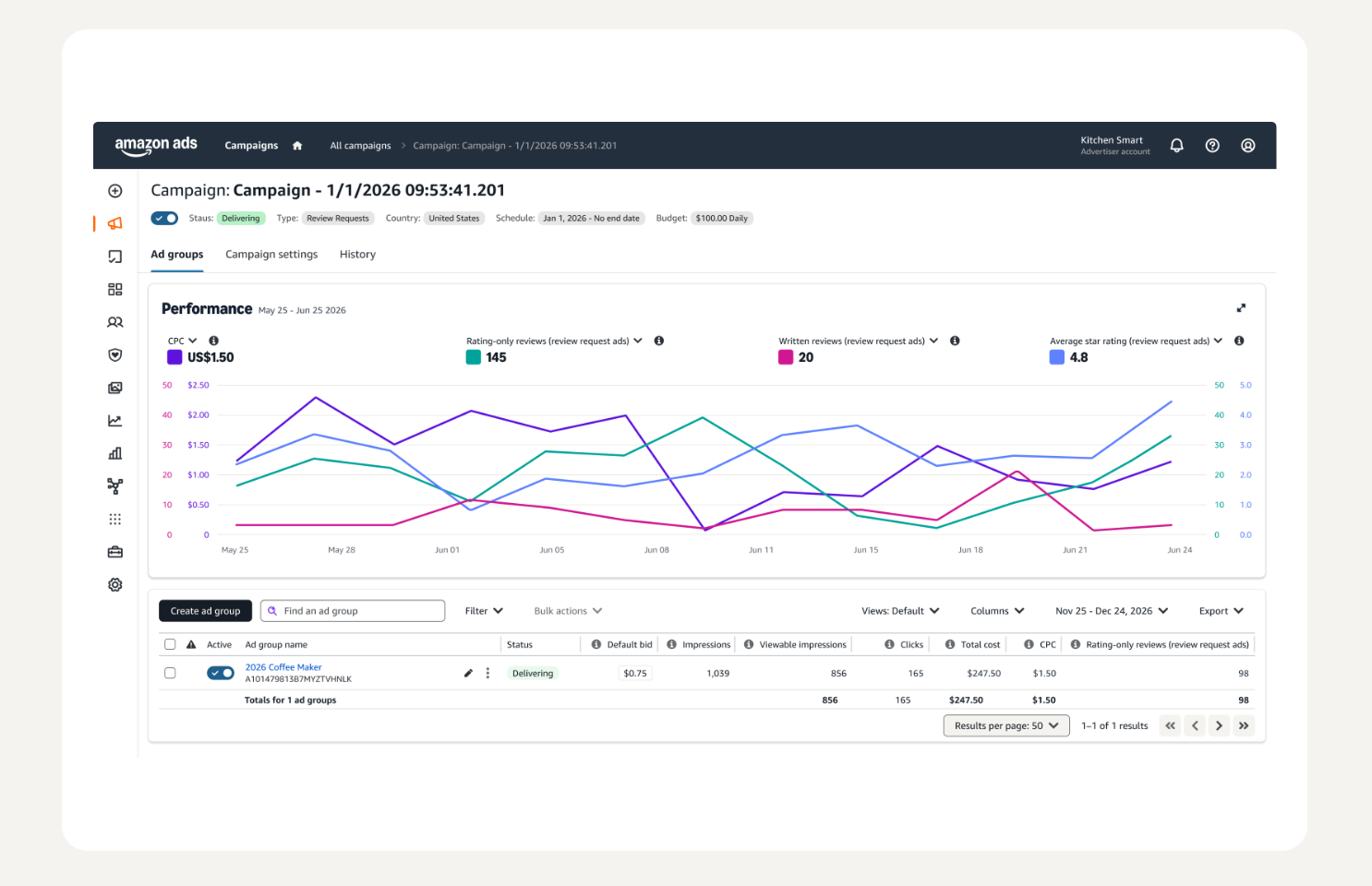
A Review Requests campaign's own performance view.
Reporting runs at the ad group level, charted over time: CPC, rating-only reviews and written reviews tracked as two separate counts rather than one combined "reviews" figure, and average star rating alongside them, not just a running total. The table below the chart adds impressions, viewable impressions, clicks and total cost, so cost per review isn't a figure Amazon states directly, it's total cost divided by whichever review count matters for the question being asked, rating-only, written, or both combined.
What this means for a seller
UNITIX's take
Budget Review Requests as its own line item, not folded into an existing Sponsored Products campaign. It's a separate CPC auction competing for the same advertiser's attention and the same monthly spend; treating it as one more line inside a Sponsored Products budget makes it invisible in reporting and the first thing cut when that campaign needs more room. And don't anchor a budget to the $100/day demo default: that's Amazon's own starting point in a walkthrough, not a benchmark, and actual bids will move with how contested the ASIN's category already is.
If you're sitting on a product under the 1,000-review mark, this is a second real lever next to Vine, not a replacement for it: Vine for the first handful of reviews at launch, when a product has none and needs something, Review Requests for the slower, steadier climb after that, from real customers who already decided to buy. Neither tool controls what gets written, which means the real lesson is unchanged: the product and the listing still have to earn the review, the ad only gets more people asked. We've helped sellers work through exactly that problem from the other direction, when reviews turn into a liability instead of an asset: one account grew 98% through a wave of suspicious negative reviews without the growth getting derailed by them.
Review Requests wasn't the only thing Amazon Ads shipped this season: the same month gave advertisers a single AI agent over the entire ad account, and two new campaign types built around it.
Common questions
What is Amazon Ads Review Requests?
A new Amazon Ads campaign type, opening in open beta in the US in late October 2026. Instead of showing an ad for a product, it shows a native, one-tap prompt asking a verified buyer, at least 7 days after delivery, to leave a star rating and optionally a written review, photo, or video.
When will Amazon Ads Review Requests become available?
Open beta in the US, late October 2026. Amazon hasn't announced a date for other marketplaces.
How much does Amazon Ads Review Requests cost?
It bills cost-per-click, the same mechanic as Sponsored Products: the seller pays when a shopper clicks through to the review flow, not for the prompt being shown and not a separate fee for the review itself. A demo campaign's defaults were a $0.75 bid and a $100 daily budget, Amazon's own starting point rather than a fixed price; actual bids move with competition for the ASIN.
Which products qualify for Review Requests?
Products with fewer than 1,000 total ratings and reviews at the time the campaign is created. Amazon checks eligibility continuously, so a campaign pauses automatically once a product crosses 1,000 reviews. The seller or vendor account also needs to be in good standing with no active policy violations.
Is Review Requests the same as Amazon Vine?
No, they're different tools for different stages. Vine gives away free product units to pre-approved "Vine Voices" before or shortly after launch, and the resulting reviews carry a "Vine Customer Review of Free Product" label. Review Requests runs after a product is already selling, prompts a real paying customer who already bought it, and the resulting review carries no special label at all, it looks like any other review.
Does a Review Requests review say anything different from a normal review?
No, and that's the point: it reads exactly like any other verified-purchase review, with no special label. The ad increases how many customers are asked to review a product, not what they write when they do.
Can sellers pay for positive reviews with Amazon Review Requests?
No. The ad buys a click into the review flow, not an outcome. A verified buyer who taps through rates and writes whatever they actually think, positive or negative, and a tool meant to surface more real reviews faster would defeat its own purpose if it only surfaced favorable ones.
Published by UNITIX Agency, an Amazon growth agency and an Amazon Ads Verified Partner. More at unitix.pro/insights.
Check your own product
ASIN Inspector
Paste an ASIN or an Amazon product link. You get the price and Buy Box, rank and how it has moved, ratings, images and video, and the search terms the product is clicked on. Free, and it needs no access to your account.