
We asked Alexa for Shopping 14 questions only the description could answer
Alexa for Shopping, the assistant Amazon used to call Rufus, reads the description field, and it reads the text printed inside A+ images. We tested both. The more useful finding was what happens when a listing contradicts itself, which it did in five of the products we looked at.
By Alex Tkach, CEO & Co-Founder, UNITIX Agency
See more UNITIX in Google
Add UNITIX to your Preferred Sources.
Amazon retired the name Rufus on 13 May 2026 and the shopping assistant now trades as Alexa for Shopping. The name on the button changed. The question a seller actually has is older than the rename: when a customer asks the assistant about a product, what does it read?
We tested one specific part of the listing, the description field, because it is the part sellers argue about.
Key findings
- The assistant answered 13 of 14 questions correctly where the answer existed only in the product description and nowhere else on the listing.
- On a sample of 937 physical products, 8.3% had no description at all. Among apparel and footwear that rises to 14%, twice the rate of everything else.
- Of the fourteen listings tested, only six show the description on the product page. On the rest, A+ has replaced it and the text is invisible to the shopper.
- The assistant also reads text printed inside A+ images, confirmed on one listing where a specification existed nowhere else.
- In five cases the seller's own data contradicted itself. The assistant never flagged the conflict. Once it merged two conflicting sources into a value that appears nowhere in the listing.
This page is the write-up of the UNITIX Listing Data Study, August 2026. Figures may be cited with a link to this article.
What Amazon says about the field
The argument runs as though the marketplace has no stated position. It has one, and it is published. Amazon's guide to the product detail page, April 2025 revision, sorts listing attributes into three tiers, and the description sits in the first.
Required attributes are the essential product details needed to ensure that customers are able to make informed purchasing decisions (such as the product title, a main product image, a product description, or a product price).
Not an optional field. A required attribute, alongside the title and the price. The same document says attribute completeness directly affects discoverability, and a later page is specific about what belongs in the description:
Describe major product features like size, style, and what the product can be used for. Include accurate dimensions, care instructions, and warranty information.
Dimensions, care instructions, materials. Keep that list in mind, because it is almost exactly what our test found living in the description and nowhere else.
How many sellers leave it empty
Before asking the assistant anything, we measured how often the field is filled. On a sample of 937 physical products on amazon.com, 78 had no description at all. That is 8.3%, roughly one listing in twelve. Digital products such as music tracks and television episodes were excluded, since the field does not apply to them.
Categories differ. Apparel and footwear go without a description twice as often as everything else.
| Category | Products | No description | Share |
|---|---|---|---|
| Apparel and footwear | 178 | 25 | 14.0% |
| Everything else | 759 | 53 | 7.0% |
Eight percent is not a catastrophe, but it is not nothing either. Those are products where the assistant has nothing to read beyond the title, the bullets and the attributes. That is the first half of the question, how many sellers leave the field empty. The rest of this article is the second half: what those sellers are giving up.
The test
The idea is simple. Find a fact that appears in the description and nowhere else: not in the title, not in the bullets, not in the structured attributes, not in A+. Ask the assistant that exact question. If the answer is right, there was nowhere else to get it.
The complication is that A+ is made of pictures, and a specification can be printed inside an image. So we ran automated text recognition over all 219 A+ images belonging to the listings we had shortlisted. That was not a formality. In three cases the fact turned out to be sitting in an image, and those questions had to be dropped.
Selection was the slow part. A fact that lives in the description and nowhere else is uncommon, so finding a few dozen usable ones meant reading through hundreds of listings. Of 23 prepared questions, nine were discarded after the answer came in, because the fact turned out to exist somewhere else after all. Three were inside A+ images. Two were outside the fields we had thought to check: one appeared in a video transcript on the product page, another in the alt text Amazon generates for the main photograph. Three more were cases where an attribute contradicted the description, which became a finding of its own. One could be inferred without reading anything.
Fourteen questions survived. In each one, the answer exists in exactly one place in the listing.
The result
The assistant answered 13 of 14 correctly.
The one that did not match was not the assistant's mistake. That seller had written two different values into a single description, and the assistant repeated one of them. More on that below.
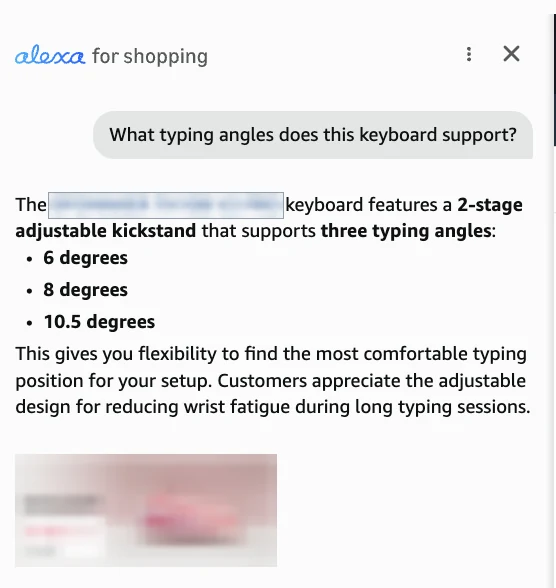
A keyboard, with no description on the page
The product page carries no description block at all. A+ has taken its place, and the numbers are not in the A+ text either, which we checked separately. We asked about the tilt angles of the kickstand.
The keyboard features a 2-stage adjustable kickstand that supports three typing angles: 6 degrees, 8 degrees, and 10.5 degrees.
Those three values exist only in the description field. On the page a shopper sees, they do not appear on a single line. Recognition over all eleven A+ images for this listing found the phrase "adjustable kickstand" and no angle at all.
A tap and die set
We asked what steel the tools are made from.
Made from GCr15 high-carbon chromium bearing steel.
The grade GCr15 is named only in the description. It is not in the title, the bullets or the attributes, and recognition across all 42 A+ images on that listing did not find it.
A rolling camera case
We asked whether the case works with AirTag or Tile trackers. The assistant said yes, described the hidden tracker pocket, and repeated the seller's own phrase, "industry first". That passage exists only in the description. The A+ images on this listing carry no text at all; recognition returned nothing.
The description is often not on the page
The keyboard was not the exception. It was the ordinary case. Of the fourteen listings, only six render the description in the familiar Product Description block. On the other eight it is not on the page: A+ occupies the space, and the text stays in the listing data.
It made no difference to the result. The assistant answered correctly whether the description was visible or not.
This is where the trap sits. A seller opens their own page, sees an A+ module where the description used to be, and concludes the field does nothing. The shopper genuinely is not reading that text. The assistant is.
It reads the pictures too
If specifications are printed inside images, the reverse question follows. Does the assistant pull text out of them?
Same test, inverted. Find a fact that exists only in an image and nowhere in the page text. One turned up on the same keyboard. Its A+ block includes a polling rate table: 1000 Hz wired, 1000 Hz over 2.4 GHz, 125 Hz over Bluetooth. The seller repeated the first two figures in text. The third stayed in the picture.
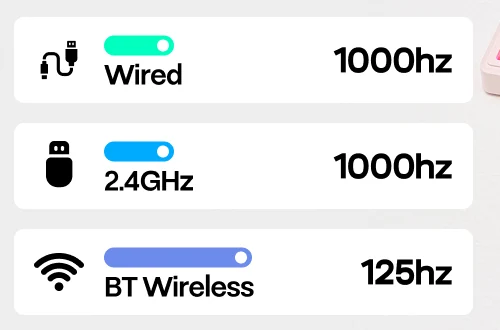
We asked for the Bluetooth polling rate.
The polling rate over Bluetooth is 125Hz. For comparison, it offers 1000Hz polling over USB and 2.4GHz.
The number 125 appears nowhere on that page except inside the assistant's own answer. Not the title, not the bullets, not the attributes, not the A+ text layer. The only place it exists is the image.
That is one confirmed case. It shows the thing is possible, not that it is dependable. The next section shows why you should not rely on it.
What we were not looking for
The main question closed quickly. What turned up along the way is more useful.
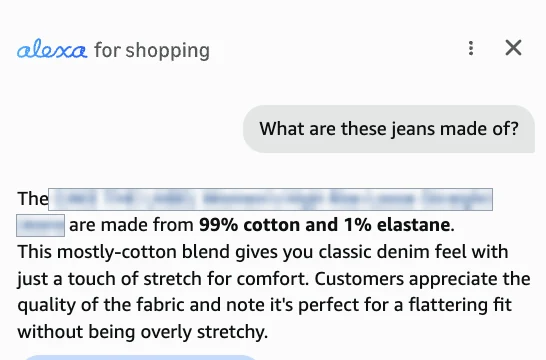
In five cases the seller's own data contradicted itself. The description said one thing and the attributes said another, and once the attributes disagreed with a picture. The assistant never mentioned to the customer that the sources diverged. It picked one value and delivered it as fact.
| Product | In the description | In the attributes | What the assistant said |
|---|---|---|---|
| Electric bike | 330 lbs | 350 pounds | 350 pounds |
| Jeans | 100% cotton | 99% cotton, 1% elastane | 99% cotton, 1% elastane |
| Tent, coating | PU2000mm and PU3000mm in one text | none | PU3000mm |
| Tent, height | 36 inches, in an A+ image | 53 inches | 53 inches |
| Sweatpants | 100% polyester | 83% polyamide, 17% spandex | 83% polyester, 17% spandex |
The last row deserves attention
On the sweatpants the assistant took the percentages from the attributes and the fibre name from the description, and produced 83% polyester. Polyamide and polyester are different materials. That composition appears in the description, in the attributes and nowhere else on the page, because it does not exist. The seller never wrote it.
What makes this one land is that the contradiction fits in a single screen. Directly beneath the assistant's answer sits the seller's own image, and the image says 83% polyamide.
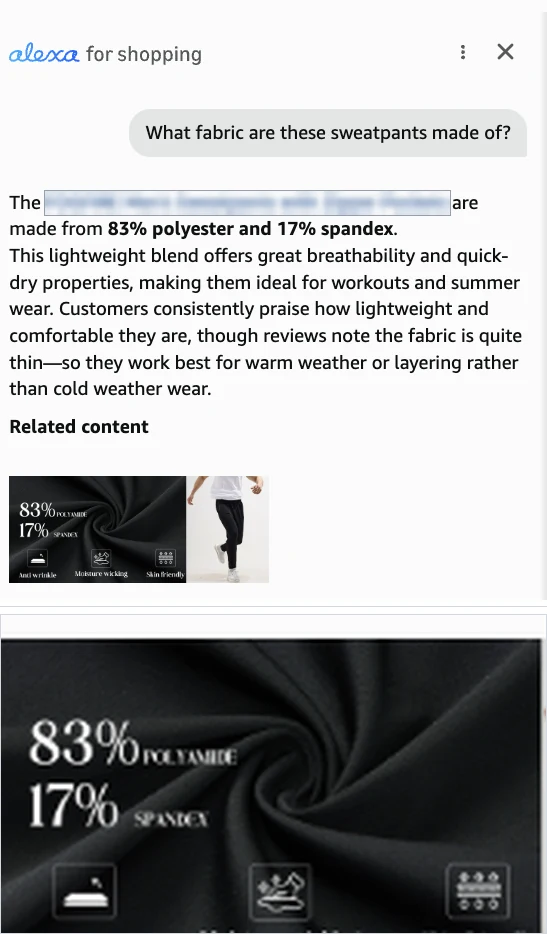
A discrepancy between a description and an attribute used to be the seller's private business. The customer saw both values and decided. Now the assistant decides for them, sometimes assembles a third value out of two sources, and states it without a caveat.
A+ does not replace the description
The usual objection is that the description is redundant because everything important is in A+. We looked at A+ twice: first the text layer, then the text inside the images.
| What the A+ block contained | Listings |
|---|---|
| No A+ at all | 3 |
| A+ present, but the only text is the brand block and carousels | 7 |
| A+ carrying its own product text | 7 |
More than half the time, A+ added no sentence about the product to the page. Where text did exist, it was more often slide captions like "Hot-Swappable" and a brand greeting than a specification.
Inside the images the picture is different. Recognition pulled almost 15,000 characters from 219 pictures. Sellers really do move specifications, size charts and material compositions in there. The catch is that this text lives in pixels.
The assistant can reach it, as the polling rate case shows. Relying on a picture as the only carrier of a specification is another matter, and the tent proves the point: when the image said 36 inches and the attribute said 53, the attribute won. The description, meanwhile, is plain text and needs no recognition at all.
What to do about it
- Write the description. Not as a formality and not as a copy of the bullets. Amazon classifies it as a required attribute, and for the assistant it is the only long piece of connected prose in the listing.
- Make the description, the attributes and the images agree. There are three sources, and any disagreement turns into a coin toss in front of a customer. Every number needs checking: weight, composition, dimensions, power, the length of included parts.
- Do not contradict yourself inside one text. The tent shows that two values in a single description are enough to make the outcome unpredictable.
- Do not assume A+ closes the question. The assistant can read text in a picture, but a picture loses to a structured field when they disagree. Repeat the specification in text, particularly since the guidance asks for accurate dimensions and care instructions in the description.
- Answer customer questions. In one case the assistant leaned on a customer question and said so.
The disagreement is the part worth automating, and it is the one nobody checks by hand across a catalogue. Our listing audit now compares the description against the structured attributes on any public ASIN and names both values when they differ. It is free, it needs no Seller Central access, and it finds the cases in this article in a few seconds. What it cannot read is a figure printed inside an A+ image, which is still a manual job.
Limits
Fourteen listings is not a representative sample of the market, and thirteen out of fourteen is a count, not a rate. We worked only on amazon.com and only in English.
The selection method has a bias worth stating plainly. We deliberately looked for facts that exist in exactly one place, which is close to guaranteeing a correct answer if the assistant reads listing text at all. So the result demonstrates that the description is read. It does not measure how reliably the assistant answers on an ordinary listing, where the same fact usually sits in several fields at once and the failure modes are different. Anyone quoting the 13 of 14 as an accuracy rate would be quoting it wrong.
One more thing a reader should weigh. UNITIX audits and rewrites Amazon listings for a living, so the conclusion of this study happens to describe work we sell. That does not make the measurements wrong, and every one of them is stated precisely enough to be repeated by someone with no such interest. It does mean this is not an independent source, and it should be read as one party's evidence rather than a neutral audit. Text inside A+ images was read by automated recognition, which is not infallible and can miss small or decorative type. Assistant answers differ between customers and change over time, so every conclusion here describes the listings as they stood in August 2026. We do not publish product names, brands or ASINs: several of these listings contain seller errors, and pointing at individual stores is not the purpose of the work.
Published by UNITIX Agency, an Amazon growth agency and an Amazon Ads Verified Partner. More at unitix.pro/insights.
Check your own product
ASIN Inspector
Paste an ASIN or an Amazon product link. You get the price and Buy Box, rank and how it has moved, ratings, images and video, and the search terms the product is clicked on. Free, and it needs no access to your account.