
Amazon is rewriting non-compliant titles. You get 14 days to object
Amazon generates a compliant rewrite for any title over 75 characters and applies it if nobody objects inside 14 days. What changed, the dates, and how to decide the split yourself.
By Alex Tkach, CEO & Co-Founder, UNITIX Agency
See more UNITIX in Google
Add UNITIX to your Preferred Sources.
Amazon has answered the common questions about the title update it announced in June 2026, and two dates in that answer matter more than the rest.
Since June, sellers have updated more than 984 million product titles.
What actually changed
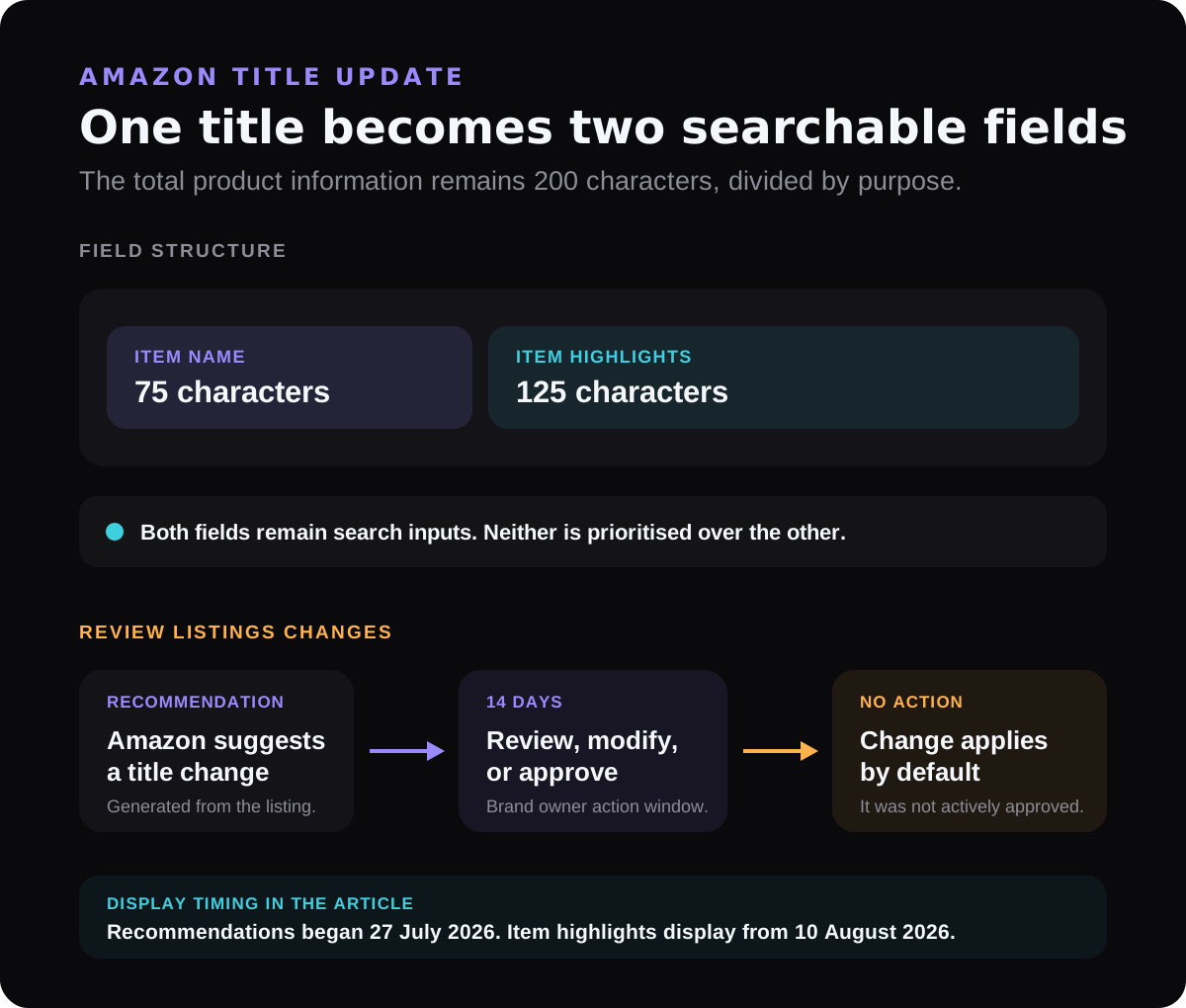
Your 200 characters of product information are now split across two fields:
- Item name: 75 characters
- Item highlights: 125 characters
The 75-character requirement includes spaces and applies to all categories except media. Item highlights can carry materials, use cases, and comparison details. Amazon says both fields are searchable and can appear together in search results and on product detail pages.
Check your Amazon title by ASIN
Enter an ASIN or Amazon product URL. The analyzer retrieves the current catalog title, checks its length and restricted characters, and creates a length-based preview of the new two-field structure.
Amazon's recommendation is to keep your brand name in the Item name, and distribute everything else across the two fields.
For variations, put the most important variating attributes in the Item name. If 75 characters will not hold them all, keep the most important there and move the rest to Item highlights.
The two dates
27 July 2026: Amazon began issuing recommendations on non-compliant listings, generated from your existing titles.
10 August 2026: Item highlights begin displaying beneath the Item name, on both desktop and mobile. How many characters are visible will vary with screen size and display settings.
The part to act on
Brand owners get 14 days to review, modify, or approve AI-generated changes in Review Listings Changes before they are implemented.
That window is the whole story. If nobody opens Review Listings Changes, the machine-generated version of your title goes live by default. It goes live not because it was approved, but because it was not contested. On a large catalogue that is a lot of titles changing without anyone reading them.
You can also update listings yourself at any time through Manage All Inventory or the List Your Products tool, and disagree with anything Amazon has already applied.
What is not changing
Search discoverability is unchanged. Item name and Item highlights are both search inputs, and neither is prioritised over the other.
This is worth stating plainly because the assumption runs the other way: sellers see a shorter title field and conclude that keywords moved to Item highlights have been demoted. They have not.
Listings stay live throughout. Changes roll out across 2026, and listings remain active, editable, and searchable whether or not they have been updated.
Bulk editing
Download the Category Listings report. It comes pre-populated with your existing product information, and the Item highlights field sits next to Item name.
Edit both fields in the spreadsheet, save, and upload through the List Your Products tool. Listings typically update within eight hours.
For any catalogue beyond a handful of ASINs, this is the only sensible route.
What we would do first
Find every title over 75 characters. Those are the listings Amazon will generate a recommendation for, so they are where the 14-day clock is running.
Open Review Listings Changes before doing anything else. Pending edits are time-limited; your own rewrites are not. Deal with the thing that expires.
Decide the split deliberately. Brand name plus the attributes a buyer uses to pick between your variations belong in the 75 characters. The 125 characters are for detail that supports the decision rather than making it.
Then check how it reads. From 10 August the two fields display together, so a title that ends mid-thought and a highlights field that repeats it will be visible to customers as one awkward block.
The checker confirms character length only. Before publishing, also check category-specific wording, restricted claims, and Amazon's general title requirements. The same check runs on its own page in the Amazon title analyzer, which is where to go when you have a batch of titles to work through rather than one.
Full detail is in Amazon's official Seller Central announcement.
Published by UNITIX Agency, an Amazon growth agency and an Amazon Ads Verified Partner. More at unitix.pro/insights.
Check your own product
ASIN Inspector
Paste an ASIN or an Amazon product link. You get the price and Buy Box, rank and how it has moved, ratings, images and video, and the search terms the product is clicked on. Free, and it needs no access to your account.