
Amazon Vine: what it costs and what it caps
Vine has not cost a flat $200 since October 2023. The fee now follows the units you enrol, and so does the number of reviews Amazon keeps on the listing.
By Alex Tkach, CEO & Co-Founder, UNITIX Agency
See more UNITIX in Google
Add UNITIX to your Preferred Sources.
Most of what is written about Amazon Vine still says it costs $200. That was the rate card until 18 October 2023. Since then the fee follows the number of units you enrol, and the same number decides how many Vine reviews Amazon will keep on your listing. Choosing the tier is the whole decision, and it is made before a single reviewer sees the product.
Everything below was checked against Seller Central's own Vine help pages on 6 September 2026.
What it costs
The fee is charged once per parent ASIN enrolment, and the rate comes from the units you put in.
| Units enrolled | Enrolment fee | Vine reviews kept on the ASIN |
|---|---|---|
| 1 to 2 | $0 | 2 |
| 3 to 10 | $75 | 10 |
| 11 to 30 | $200 | 30 |
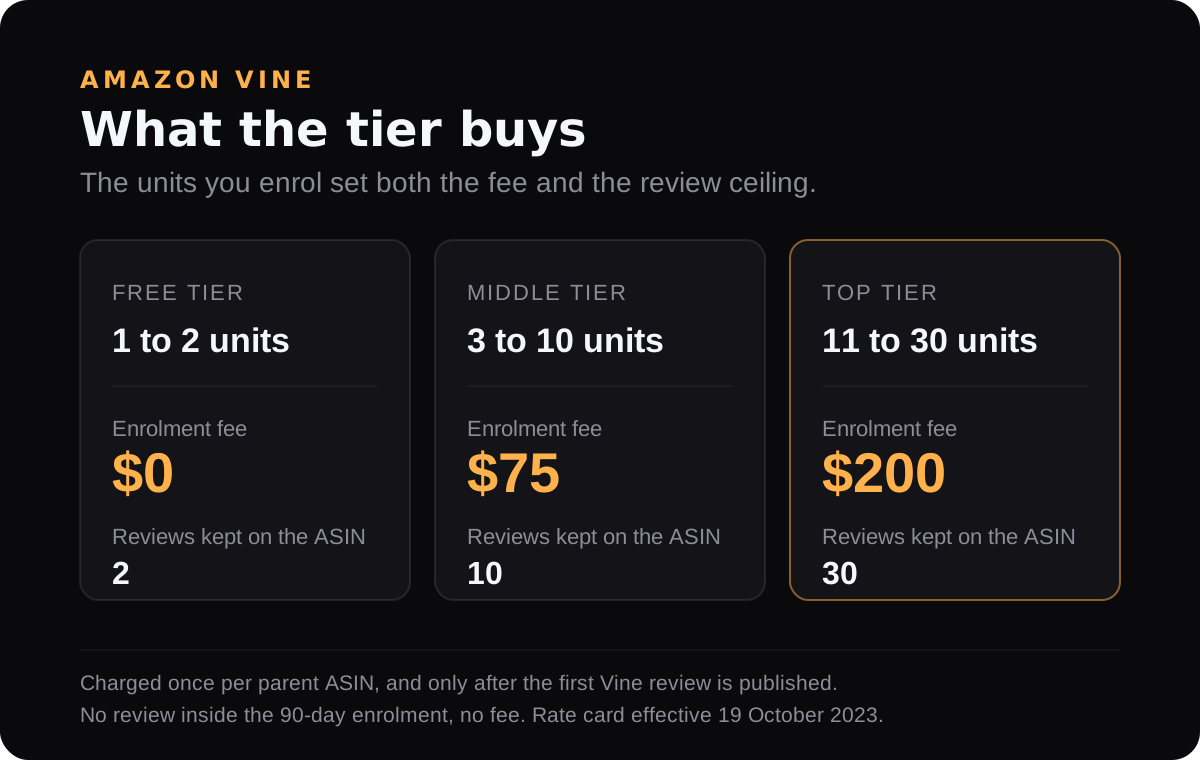
The free tier is real. Two units cost nothing and can return two reviews, which for a listing at zero is not a small thing.
On a newly listed ASIN, check the New Selection Program before paying anything: it carries a $75 Vine credit for a middle-tier enrolment in the first 60 days of a buyable offer, and an ASIN in Vine pre-launch extends every one of its benefit windows by 45 days.
The right column is the part sellers miss. There is a limit on how many Vine reviews are retained at parent ASIN level per Amazon store, and it is set by the tier you bought. Enrol two ASINs at the top tier, get 30 reviews on each, then merge them under a new parent, and the new parent keeps 30, not 60. Reviews cannot be moved between ASINs afterwards, and Amazon does not guarantee that reviews survive a merge at all.
When you are actually billed
You are billed 30 days after enrolment, and only if the product has received at least one Vine review by then. If the first review arrives later, billing happens when that review is published. If nothing is reviewed inside the 90-day enrolment, there is no fee.
The amount does not move with how many units reviewers claimed or how many reviews you ended up with. Three units enrolled and one review published is still $75.
Units can be added within 30 days of the start date, and adding them can push you into a higher tier and a higher rate. Units cannot be removed. Amazon's own enrolment page says the quantity cannot be changed once the enrolment is submitted, so treat adding units as something to check in the dashboard rather than to plan a budget around.
Who can enrol
- A professional selling account.
- A Brand Representative or Reseller role on a brand registered in Brand Registry.
- An active FBA offer with inventory. Vine Voices are shipped by Amazon, which is how their anonymity is kept, so there is no seller-fulfilled route.
- No history of FBA Onsite. Sellers who participate or have participated in it cannot use Vine.
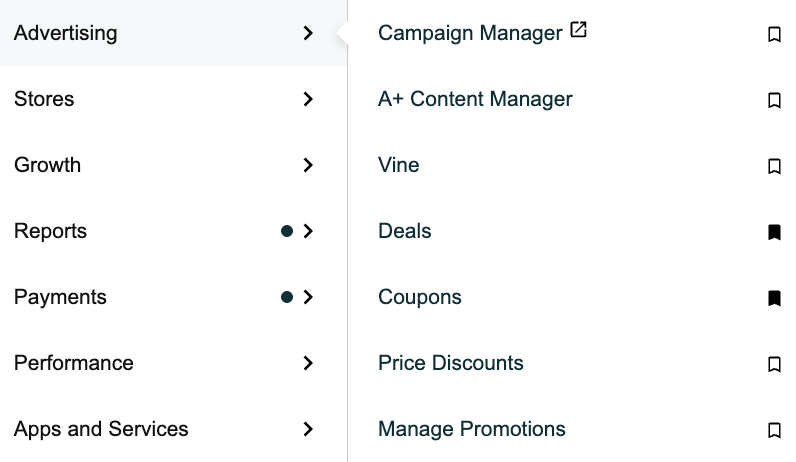
Vine lives under Advertising, then Vine in the Seller Central menu, next to Campaign Manager and A+ Content Manager. If it is not there at all, it is usually permissions rather than eligibility: Settings, User Permissions, Manage Permissions, Advertising, Vine.
Which products qualify
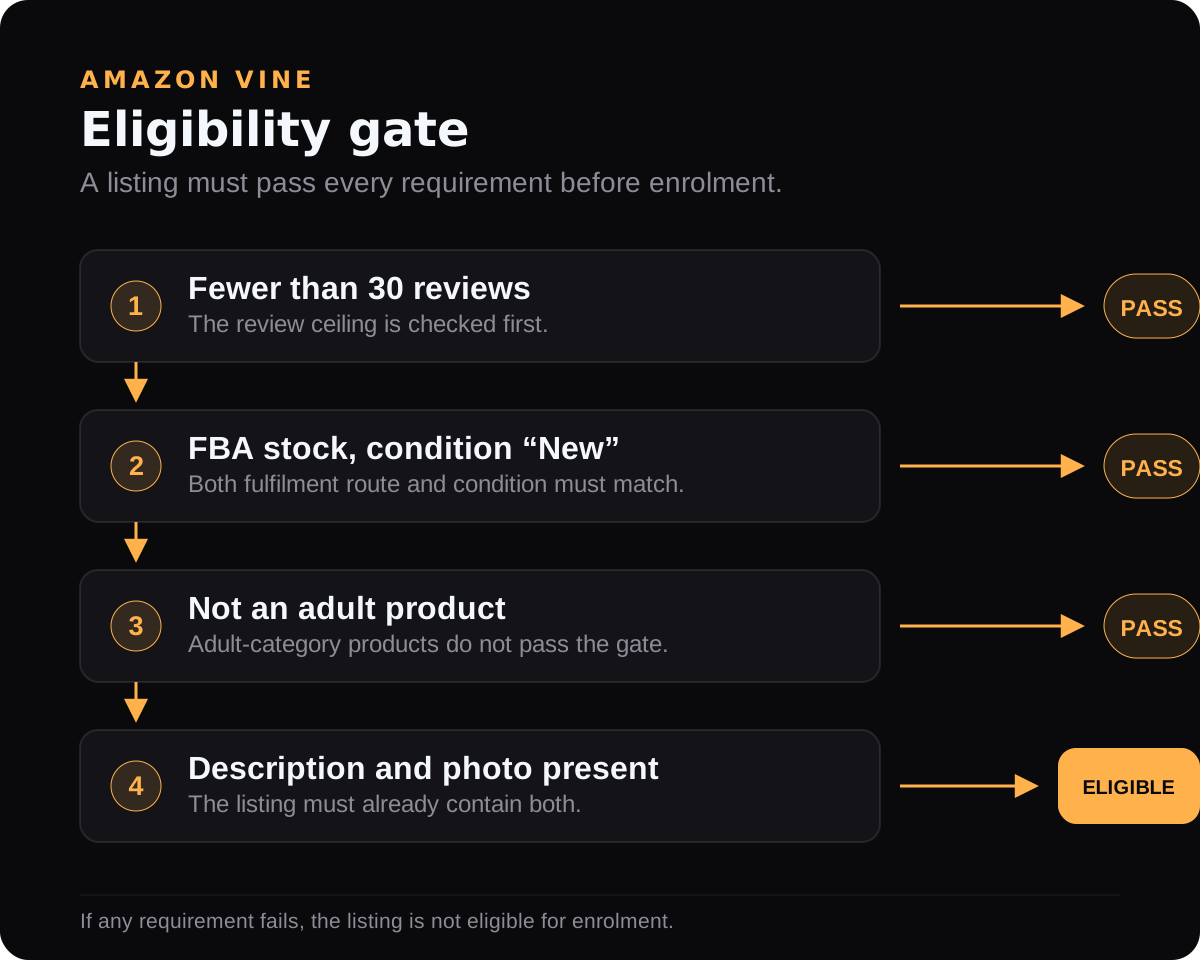
The listing needs fewer than 30 published reviews, an FBA offer with available inventory, and a finished detail page: image, description, title, and a browse node. Adult and digital products are out. So are bundles, case packs, and anything that needs a second purchase to be reviewed, with one sensible exception: accessories for widely owned products are allowed, so a case for a common phone is fine while an ink cartridge that fits one printer is not.
One rule is easy to trip over and cannot be undone. An ASIN can be enrolled in Vine once in its lifetime. Cancel an enrolment after a unit has been claimed and neither that ASIN nor any variation under the same parent can go back in.
Pre-launch Vine
This is the part that did not exist when most Vine articles were written, and it is the strongest reason to plan Vine before a launch rather than after one.
Set the Product Site Launch Date in the future, leave the offer and seller release dates empty, then enrol the product the normal way. You can enrol as soon as the FBA listing exists, before inventory reaches the fulfilment centre. Amazon's own recommendation is to have inventory in the network at least three weeks before the launch date, so Voices have time to receive, use and write.
- Regular customers cannot see or order a pre-launch product. Only Vine Voices can.
- The 90-day enrolment clock starts when inventory is received and buyable, not when you enrol.
- The reviews stay hidden from everyone, you included, until the launch date.
- Voices see the item name, brand, bullets, image, size, colour and price pulled from the listing, so those need to be final by the time inventory lands.
- Delay the launch and the reviews appear on the new date. Cancel it and they never appear.
- The ceiling is the same 30 reviews per parent ASIN, before or after launch.
Done properly, this is the difference between a launch that starts at zero reviews and one that starts at ten or thirty on day one.
How fast they arrive
Enrolment is immediate for an eligible ASIN, and in most cases Vine Voices can start ordering units within 24 hours of it completing. They can review as soon as the product reaches them.
Amazon publishes two figures for what happens after that: about 25% of the reviews it receives arrive within five days of the order, and 99% within 35 days.
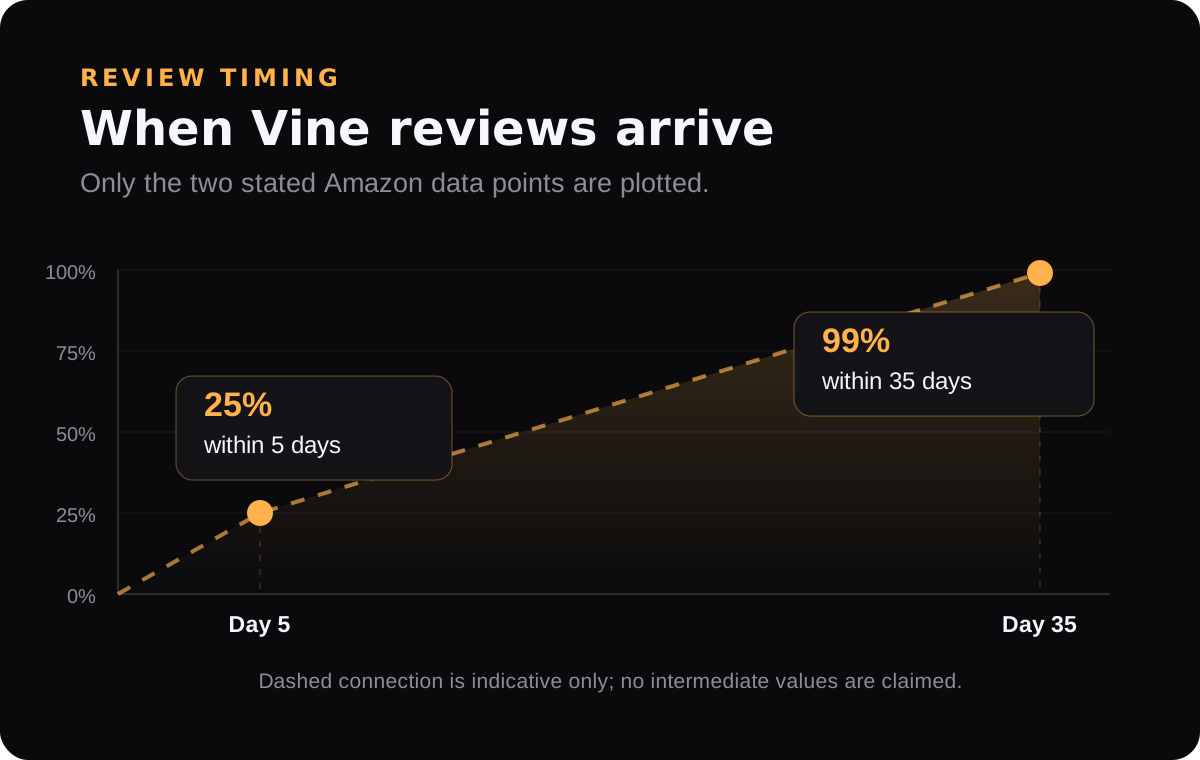
Read those carefully before planning a launch around them. The clock runs from the reviewer's order, not from your enrolment, so it says nothing about how long units sit unclaimed. Amazon also attributes the numbers to its worldwide reviewer population as of April 2018, which makes them the shape of the curve rather than a forecast for your ASIN in 2026.
Nothing obliges a Voice to claim your product or to review one they received, and a unit that arrives damaged or mislabelled can have its order cancelled on request. A quiet enrolment is not a fault to fix. It is also why the fee only appears once a review does.
What happens over the 90 days
An enrolment runs for 90 days from enrolment, or from the scheduled start date if you set one. It will not conclude inside the first 30 days. After that it concludes once every enrolled unit has been reviewed, or when the 90 days run out, whichever comes first. Voices have no deadline of their own, so a review can still land after the enrolment has concluded.
The dashboard shows each enrolment as scheduled, awaiting reviews, reviews in progress, concluded, cancelled, or action required. The blockers worth knowing are the ones you can fix: the SKU lost its FBA offer, the listing has no compliant image, the SKU is not associated with a brand you hold a role on, or the product is no longer part of the variation family you enrolled. The one you cannot fix is the review ceiling: at 30 published reviews Amazon stops offering the product and concludes the enrolment on its own.
You can hold up to 200 active enrolments at a time across the account.

That is the dashboard on a live account, with the client's product name and ASIN covered. The columns worth watching are the last three: units enrolled, units claimed, and reviews published. A row where claimed matches enrolled and reviews sits at zero is the normal middle of an enrolment, not a problem.
Four things that surprise sellers
A review you paid for can be negative. Voices get the product free and see their job as an honest verdict, positive or negative. Inside Amazon's community guidelines, a bad Vine review is not going anywhere. Vine is a poor rescue plan for a product with a real quality or listing problem, and a good one for a product that is genuinely fine and simply has no history.
FBA and referral fees still apply. Vine units stay purchasable by ordinary customers while they sit there, so Amazon does not waive fees on them. Units nobody claims stay in inventory and sell normally.
Your reports move. Claimed Vine units appear in Business Reports inside Units Ordered and Ordered Product Sales, because those are counted before discounts, and in Orders Reports they show a promotion price equal to the item price and no customer name. If you are reading revenue during a Vine window, read Payment Reports instead, or you will be looking at sales that never happened.
Vine is per store. The review ceiling is counted per Amazon store, so a marketplace you also sell on is a separate enrolment and a separate fee.
How we choose the tier
The free tier is worth taking on anything eligible, because two reviews for nothing changes a zero-review listing. Past that the question is what 10 or 30 reviews are worth on this listing, at this price, at this stage.
Before paying $200, work out what those reviews do to the rating rather than to the count. Thirty reviews at 4.2 and thirty at 4.8 are different products in search results. The rating calculator runs it in both directions: where a run of Vine reviews leaves the average, and how many more reviews it would take to reach the rating you want.
And time it. Vine is a launch instrument, and pre-launch enrolment is the version of it that actually helps a launch, rather than arriving three weeks after the advertising has already been buying clicks for a listing with no social proof on it.
Published by UNITIX Agency, an Amazon growth agency and an Amazon Ads Verified Partner. More at unitix.pro/insights.
Check your own product
ASIN Inspector
Paste an ASIN or an Amazon product link. You get the price and Buy Box, rank and how it has moved, ratings, images and video, and the search terms the product is clicked on. Free, and it needs no access to your account.